📌 Quick Summary

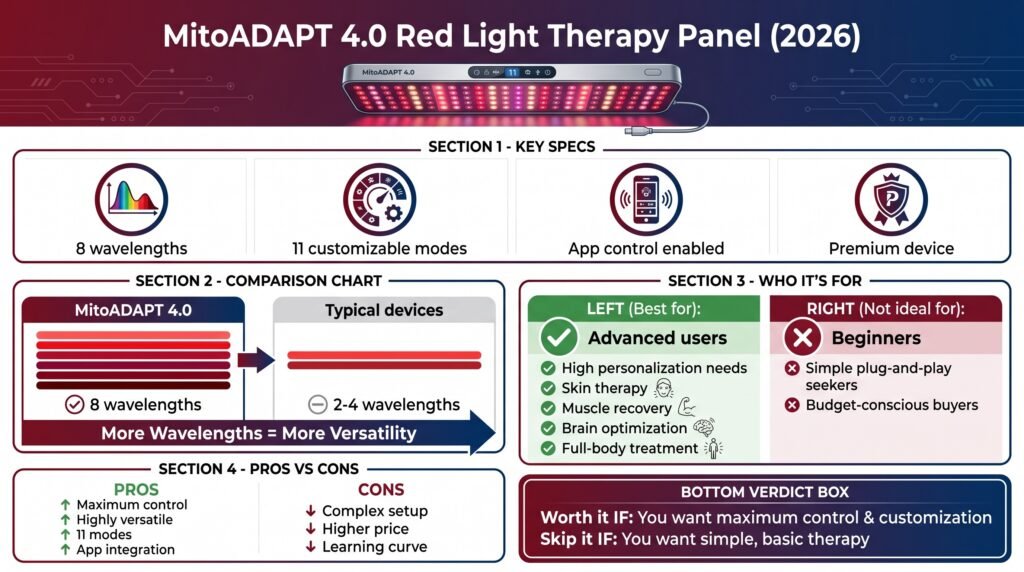
The MitoADAPT 4.0 is one of the most advanced red light therapy panels in 2026, featuring 8 wavelengths and 11 customizable modes—far more flexible than typical 2–4 wavelength devices. It’s ideal for users who want high personalization (skin, recovery, brain, or full-body use), but the complexity and higher price mean it’s not beginner-friendly.

👉 Bottom line: If you want maximum control and versatility, it’s worth it. If you want simple plug-and-play therapy, it’s probably overkill.

đź§ľ Table of Contents

  •  Introduction 
  • Brand Overview of Mito Red Light
  • Product Range Analysis
  • What the 11 Modes Actually Do
  • Quality and Performance Testing
  • How Does MitoADAPT Compare to Alternatives – Prices & Results Don’t Lie
  • Red Light Therapy Savings Calculator
  • Against Other Premium Multi-Wavelength Panels
  • Setup and Getting Started
  • Troubleshooting Common Issues
  • Conclusion and Next Steps
  • Frequently Asked Questions

Introduction

Red light therapy panels used to be simple. You turned them on, stood in front of them, and hoped for the best.

This MitoADAPT 4.0 Review changes that conversation completely. This panel gives you eight different wavelengths and eleven separate modes, each targeting different health goals.

You can work on skin issues one day, then switch to muscle recovery the next, all from the same device.

But here’s the thing. More features don’t automatically mean better results.

And when you’re looking at this kind of investment, you need to know exactly what you’re getting and whether it actually performs better than the choices.

Let’s break down what this panel does, how it compares to other options, and whether the price tag makes sense for your situation.

Brand Overview of Mito Red Light

Mito Red Light has been selling red light therapy devices for several years now. They started with basic panels and kept improving based on what customers actually wanted.

The big shift happened with the Adapt 4.0 series. Instead of just adding more wavelengths for marketing purposes, they built something called TruDUAL chip technology.

This is a patent-pending system that lets you control each wavelength independently as opposed to running everything at once with reduced power.

Most premium panels offer maybe 2-3 fixed modes that share the same circuits. When circuits share power, turning on multiple wavelengths means each one gets dimmed. Think of it like running too many appliances on the same outlet.

The company’s co-founder, Kayleigh Chaverri, said they listened to their community and realized people wanted real choice, not just more LEDs. They wanted to experiment and learn what actually worked for their specific goals.

Whether that’s smart product development or good marketing probably doesn’t matter. The technology backs up the claim either way.

Mito also makes the MitoPro series and several other models. The Adapt 4.0 sits at the top of their lineup as the most advanced option they offer.
Product Range Analysis

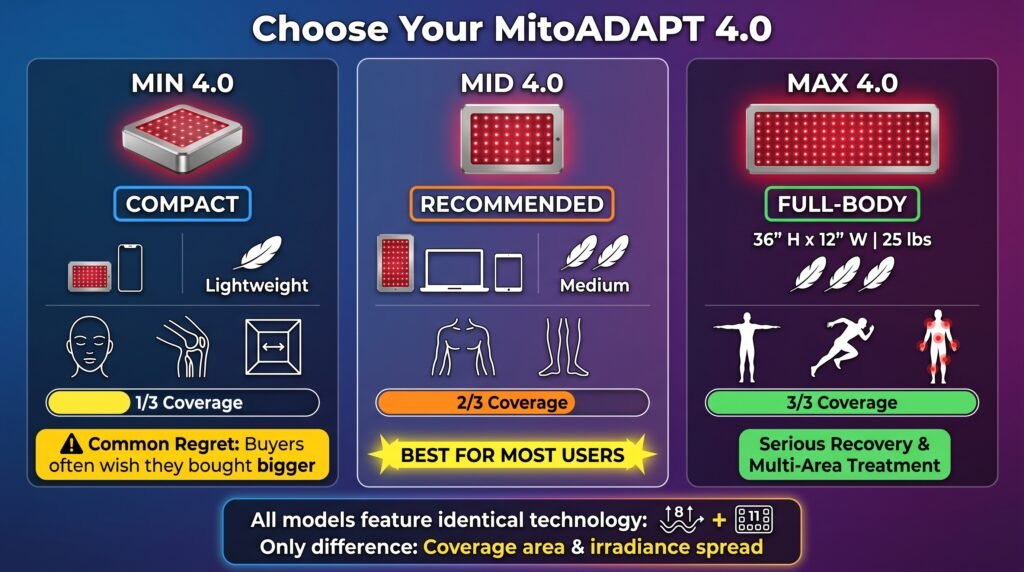
The MitoADAPT 4.0 Review covers three different sizes, and this is where people get confused.
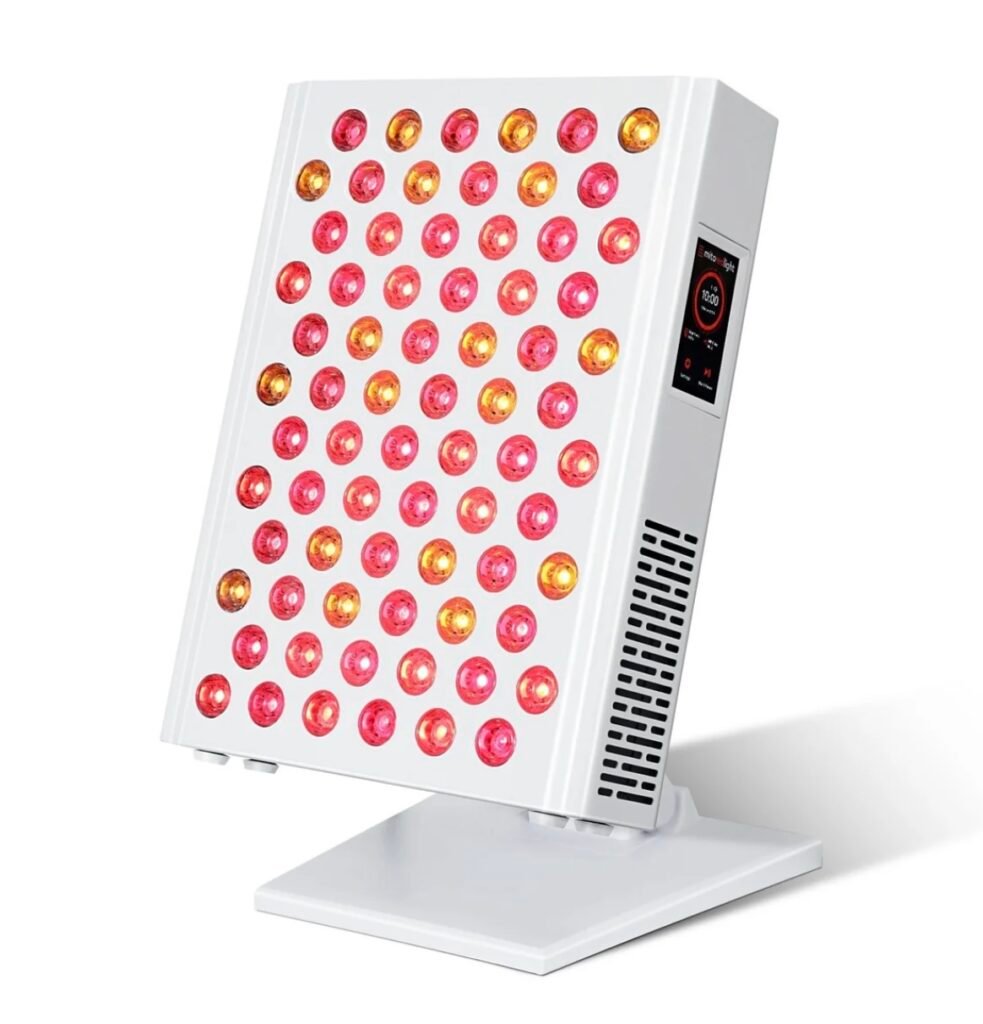
MitoADAPT MIN 4.0 Series
MitoADAPT MID 4.0 Series
MitoADAPT MAX 4.0 Series

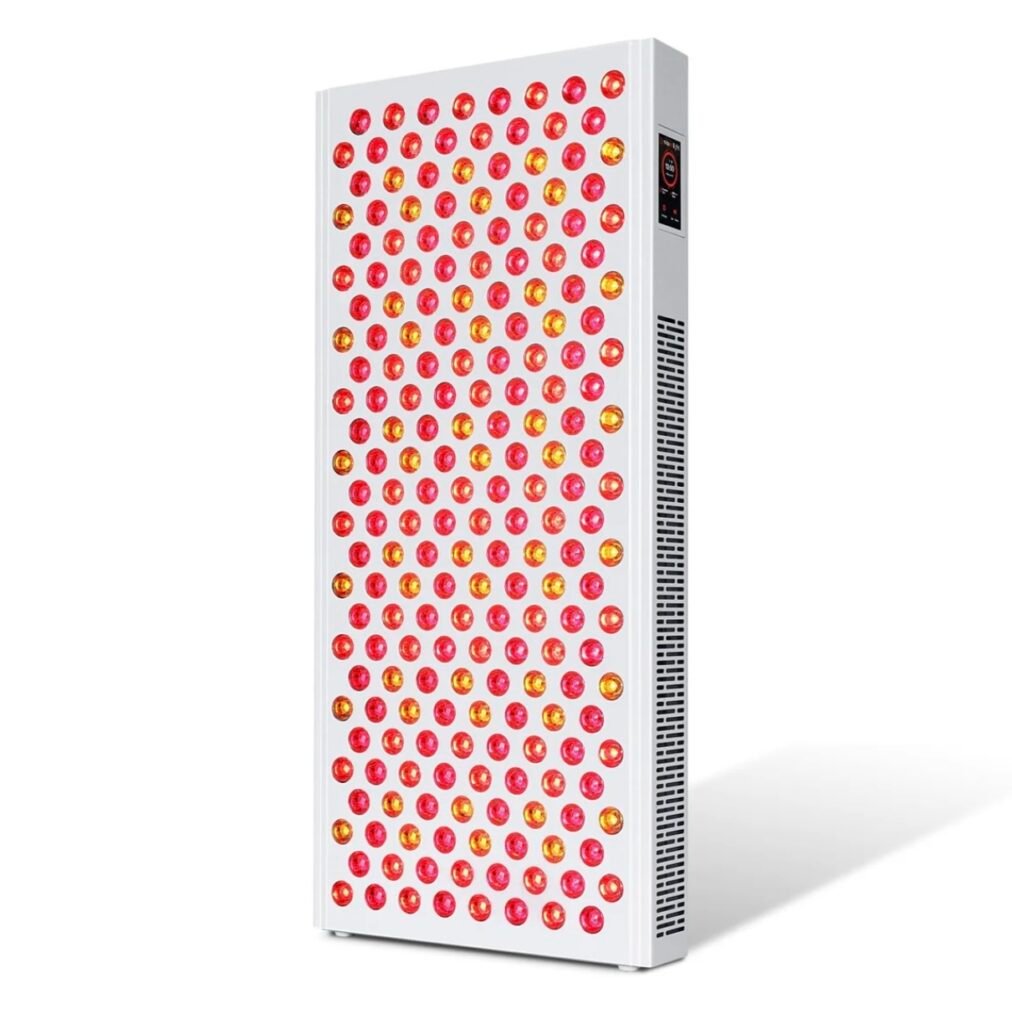
MitoADAPT MIN 4.0 works as a tabletop unit. You can use it for facial treatments, targeted joint work, or situations where you don’t have wall space.

The tradeoff is coverage area.

You’re not getting a full-body treatment with this one.

A lot of people buy the mini version to save money and then wish they’d spent extra for better coverage later.

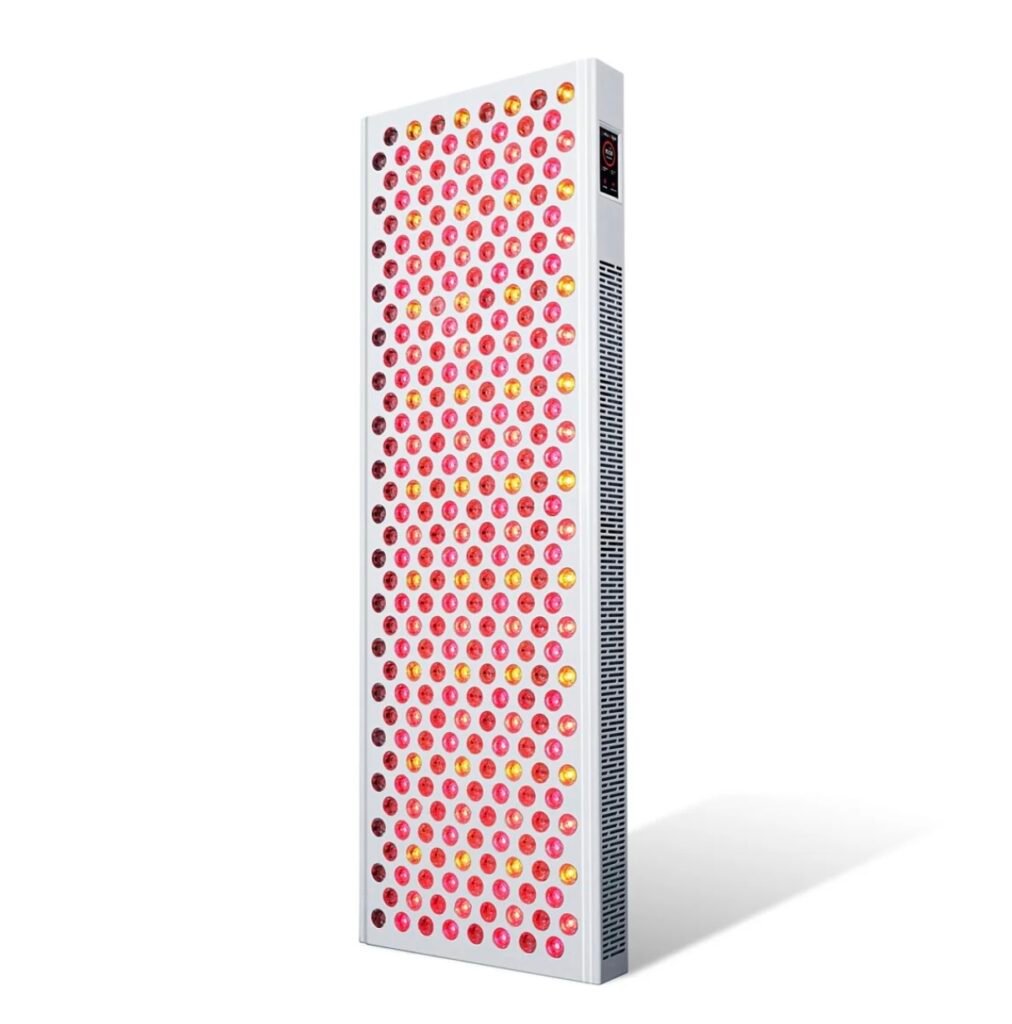
MitoADAPT MID 4.0 splits the difference. It handles most use cases without needing an entire wall in your bedroom or office.

For most people who want decent coverage without the commitment of a massive panel, this makes the most sense.

MitoADAPT MAX 4.0 is the full-body option. It measures 36 inches tall, 12 inches wide, and weighs 25 pounds.

This is what you want if you’re serious about athletic recovery, whole-body benefits, or treating multiple areas in one session.

All three sizes contain the same eight wavelengths and eleven modes. The only difference is how much area they cover and how the irradiance spreads out.

MitoADAPT 4.0 Size Comparison
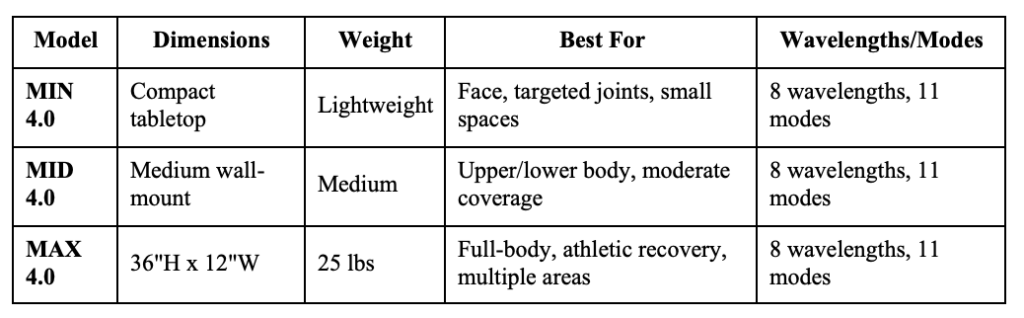
What the Product Range Actually Looks Like

What the 11 Modes Actually Do

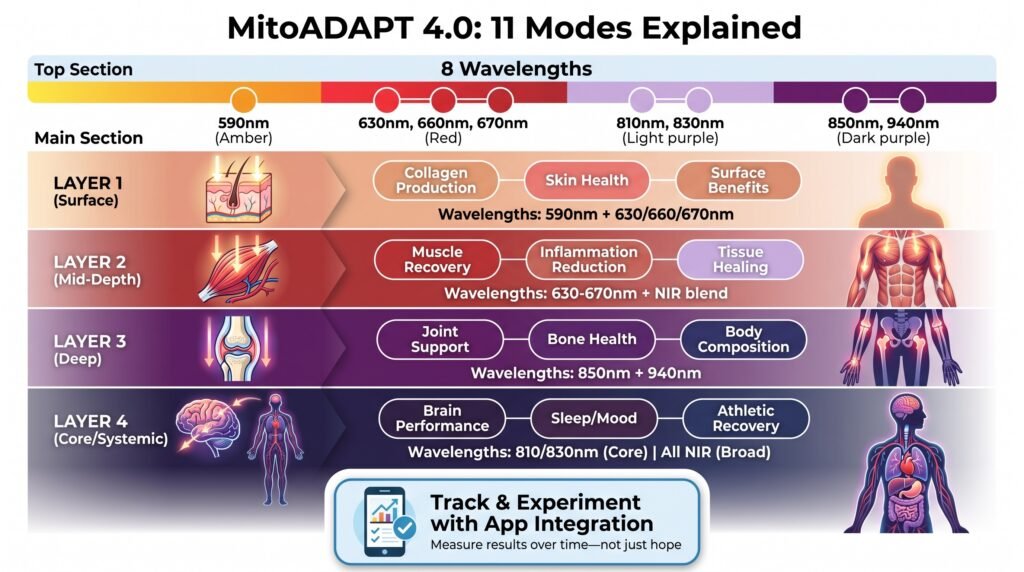
This is where the MitoADAPT 4.0 Review gets interesting. The panel includes eight wavelengths: 590nm (amber), 630nm and 660nm (red), 670nm (red), 810nm and 830nm (near-infrared), 850nm (near-infrared), and 940nm (near-infrared).

The eleven modes are different combinations of these wavelengths. Each one targets specific outcomes.

Amber + Red combinations work on skin health, collagen production, and surface-level benefits. The 590nm amber wavelength is pretty uncommon in consumer panels.

Research supports amber’s role in certain skin applications, which is why Mito included it.

Mid-range red and NIR combinations address muscle recovery, inflammation, and localized tissue healing.

Deep NIR modes (850nm/940nm) target joints, bone-adjacent tissue, and body composition changes.

Core NIR modes (810nm/830nm) are designed for brain performance, focus, sleep, and mood regulation.

Broad NIR modes use all near-infrared wavelengths together for full-body systemic recovery and athletic performance.

The advantage isn’t that these modes are magic. The advantage is you can experiment and track which combinations actually work for your goals using the app.

Most red light therapy panels don’t give you this kind of flexibility or any way to measure results over time.

You just turn them on and hope.

Quality and Performance Testing

Let’s get specific because most reviews stay vague here.

The MitoADAPT 4.0 delivered measured peak irradiance of 74 mW/cm² and average irradiance of 58 mW/cm² across a nine-point test. Total therapeutic output is 133 watts.

In context, this places the panel firmly in the middle of the market. Not the most powerful option available, but respectable.

If you’re coming from a cheap Amazon panel claiming 200 mW/cm², understand that those numbers are usually measured at unrealistic distances. The Mito’s numbers are measured at practical working distances where you’d actually use the panel.

The panel houses 288 dual-chip LEDs. Many chips are packed into each lens.

This is the architecture that enables independent wavelength control without proportionally sacrificing power in each mode.

EMF (electromagnetic field) is extremely low at a distance of 6 inches. If you were worried about that (some people are), you can stop.

The build quality feels solid. The panel doesn’t feel cheap or flimsy.

The touchscreen is responsive.

The cooling fan runs quietly enough that it doesn’t bother you during sessions.

One thing to note: the panel gets warm during use. That’s normal for LED panels at this power level, but don’t mount it somewhere that needs to stay cool.

How Does MitoADAPT Compare to Alternatives – Prices & Results Don’t Lie

Against Professional Clinical Sessions

This is the comparison that actually matters for most people.

A professional red light therapy session at a clinic typically costs $75-$125 per visit.

People doing regular treatment (2-3 times per week) spend $600-$1,000 monthly. That adds up fast. The MitoADAPT MIN 4.0 delivers a professional caliber therapy starting at $549.

The MitoADAPT MAX costs $1,499, but you break even on professional sessions within 2 months if you were already paying for treatments.

After that, you’re getting unlimited home use for just electricity costs in the convenience of your own home on your schedule.

This convenience helps with consistency and, therefore, results.

Also, Mito devices are HSA/FSA eligible. That means you can apply pre-tax money to your purchase for additional savings.

Use the cost-savings calculator below to crunch the real-time numbers of a MitADAPT vs. red light sessions within a clinical environment. Bookmark this page and return to it anytime you are comparing red light therapy services in your area.

Red Light Therapy Savings Calculator

đź’° Red Light Therapy Savings Calculator

Discover how much money you’ll save by owning a MitoADAPT Red Light Device versus paying for professional clinic sessions. Calculate your break-even point and long-term savings.

Professional Clinic Sessions
Your Clinic Costs
Weekly Cost $250
Monthly Cost $1,000
Total Cost Over Selected Period $12,000
TOTAL YOU’LL SPEND AT CLINICS
$12,000
Over 12 months of treatment
HSA/FSA Eligible
MitoADAPT MIN 4.0
$549
One-Time Cost: $549
Break Even In: 2.2 weeks
1-Year Savings: $11,451
2-Year Savings: $23,451
HSA/FSA Eligible
MitoADAPT MAX
$1,499
One-Time Cost: $1,499
Break Even In: 6.0 weeks
1-Year Savings: $10,501
2-Year Savings: $22,501

🎯 Additional Savings with HSA/FSA

Both MitoADAPT devices are HSA/FSA eligible! Use pre-tax dollars to purchase your device and save an additional 25-35% depending on your tax bracket. Plus, enjoy unlimited home use for just electricity costs on your schedule – no more driving to appointments or waiting rooms.

Against Basic Home Panels

Budget red light panels ($200-$300) offer one or two fixed settings and no tracking. They work fine for simple use cases, but you’re limited to whatever wavelength combination the manufacturer decided was best.

The MitoADAPT 4.0 costs more, but you get flexibility and data tracking that actually lets you improve your approach over time.

You can test different modes and see what actually produces results instead of guessing.

Against Other Premium Multi-Wavelength Panels

Mito’s own lineup offers the MitoPro+ (4 wavelengths, 3 modes) and MitoPro X (6 wavelengths with app support).

The Adapt 4.0 adds 8 wavelengths and 11 modes, which gives you substantially more control.

Whether that justifies the price difference depends on your goals and budget.

The real question isn’t whether the Adapt 4.0 is better than everything. The question is whether the specific features you get (multiple wavelengths, independent circuits, app tracking, 11 modes) address your actual priorities.

If you just want basic red light therapy and don’t care about customization, a simpler panel might make more sense.

To experiment and improve for specific outcomes, the Adapt 4.0 gives you tools that other panels don’t.

Setup and Getting Started

The MitoADAPT 4.0 has three control options: the onboard touchscreen, the mobile app via Bluetooth, or both.

The touchscreen alone let’s you choose modes, adjust brightness, set session timers, and control pulsing without needing your phone. This works great for people who want simplicity.

Navigate to your preferred mode, tap start, and you’re done.

The Mito Red Light app (iOS and Android) opens up more functionality. You can track session history by mode, log subjective feedback, and analyze what’s actually working for you over time.

The app syncs session data, so you can compare results across weeks or months to find patterns.

One thing to know: the app can only control one device at a time. This matters if you’re thinking about buying multiple panels.

The real friction point isn’t the technology. The friction point is that the eleven modes aren’t labeled with user-friendly names on the panel itself.

Most modes just show which wavelengths are active. You’ll need to reference the manual or app to know which mode targets what.

It’s functional but needs initial familiarization.

Setup itself is straightforward. If you’re mounting the panel on a wall, you’ll need to install the included bracket.

If you’re using it as a floor stand, you just attach the base.

The panel connects to your phone via Bluetooth during initial setup. The app walks you through pairing, which takes maybe 2-3 minutes.

After that, you can start your first session.

Most people start with 10-15 minute sessions and adjust from there based on how their body responds.

Troubleshooting Common Issues

The panel won’t connect to the app

Make sure Bluetooth is enabled on your phone. Restart both the panel and your phone.

If the panel still won’t connect, check if your phone’s operating system is up to date. Older OS versions sometimes have Bluetooth compatibility issues.

Try unpairing and re-pairing the device in the app settings.

The touchscreen isn’t responding

Make sure your hands are dry. The touchscreen doesn’t respond well to wet fingers.

If the screen is dirty, clean it with a soft, dry cloth.

If the touchscreen still doesn’t respond, try powering the panel off and on again.

The panel feels too hot

The panel will get warm during use. That’s normal.

But if it feels excessively hot to the touch, make sure there’s adequate airflow around the unit.

Don’t cover the ventilation areas or mount the panel in an enclosed space without proper air circulation.

Session data isn’t syncing to the app

Make sure the panel stays connected to your phone via Bluetooth during the entire session. If your phone goes into sleep mode or you walk away with it, the session data might not sync properly.

Keep your phone within Bluetooth range (typically 30 feet or less) during sessions.

I don’t know which mode to use

Start with Mode 1 (full spectrum) for general use. Track how you feel after a week of daily sessions.

Then experiment with specific modes based on your goals. The app provides descriptions of each mode and what it targets.

Give each mode at least a week of consistent use before switching to assess results properly.

Coverage seems uneven

Make sure you’re standing at the recommended distance from the panel (typically 6-12 inches for targeted treatment, 12-24 inches for broader coverage).

If you’re treating your entire body, you might need to do multiple sessions covering different areas, or stand at a greater distance where the beam spread covers more surface area.

Conclusion and Next Steps

The MitoADAPT 4.0 Review shows this panel represents a genuine shift in how home red light therapy devices are designed.

Instead of the one-size-fits-all approach, you get flexibility, independent wavelength control, and a platform for actually measuring what works for you.

The technology works. The build quality is solid.

The app integration is legitimately useful.

The main tradeoff is cost and complexity.

This isn’t an impulse purchase. This is a device for people who’ve already decided red light therapy fits their health routine and want to improve it.

Who should buy this:

  • People who already use or have used professional red light therapy and know it works for them
  • People who want to experiment with different wavelengths to find what actually produces results
  • People who have sufficient space and budget to commit to a premium home device
  • People who value tracking data and personalization over simplicity
  • People who plan to use the panel multiple times weekly, not occasionally

Who should skip this:

  • Casual users hoping one device solves everything
  • People on a tight budget who just want basic red light therapy
  • People who prefer plug-and-play simplicity over customization options

If you’re already spending hundreds monthly on professional sessions, the economics make sense. You’ll break even within a few months and then have unlimited access.

If you’re new to red light therapy and not sure if it works for you, starting with a less expensive panel to test the waters makes more sense. Once you know it works, you can upgrade to something like the Adapt 4.0.

The MitoADAPT 4.0 Review conclusion is straightforward: this is a well-designed, feature-rich panel that delivers on its promises. Whether it’s worth the investment depends entirely on how seriously you take red light therapy and whether you’ll actually use the advanced features it offers.

For people who want the best home option available and plan to use it consistently, this panel delivers.

âť“ Frequently Asked Questions (FAQ)

1. What makes the MitoADAPT 4.0 different from other red light therapy panels?

Most panels only use 2–4 wavelengths, but the MitoADAPT 4.0 uses 8 wavelengths and 11 preset modes, allowing highly customized treatments for skin, muscle recovery, brain function, and more.


2. What are the 11 modes actually used for?

Each mode combines different wavelengths for specific goals, such as:

  • Skin & collagen (red light modes)
  • Deep tissue & joints (near-infrared modes)
  • Full-body recovery (full spectrum mode)
  • Brain, sleep, and mood (core NIR modes)

3. Is the app control actually useful?

The app allows you to:

  • Select modes remotely
  • Track sessions
  • Optimize routines over time

However, some users report the app can feel clunky or limited, so it’s helpful—but not essential.


4. Is the MitoADAPT 4.0 good for beginners?

Not really. The 11 modes create a learning curve, and beginners may feel overwhelmed choosing the right settings.


5. Does more wavelengths actually mean better results?

Not automatically—but it increases flexibility. Different wavelengths penetrate different tissue depths, so more options let you tailor treatments to your specific goals.


6. Which size should I choose (MIN, MID, or MAX)?

  • MIN → Targeted use (face, joints)
  • MID → Partial body coverage
  • MAX → Near full-body sessions

Larger panels save time but cost more.


7. Is it worth the price?

It’s more expensive than basic panels, but the 11-mode flexibility and 8-wavelength system provide capabilities you’d otherwise need multiple devices to replicate.


8. Are there any downsides?

Yes—main tradeoffs include:

  • Higher cost
  • Learning curve
  • Overkill for casual users
  • App usability complaints

9. How long are sessions?

Typical sessions are around 10 minutes per area, depending on your goal and mode.


10. Is the MitoADAPT 4.0 safe?

Yes—it’s manufactured in medical-grade certified facilities (ISO/MDSAP) and uses tested wavelengths and output levels.


11. Can it replace multiple red light devices?

In many cases, yes. The wide range of wavelengths and modes allows it to function like multiple specialized panels in one device.


See our list of reviews of the most effective and affordable red light therapy devices for home use here.

This article includes affiliate links. If you click through and make a purchase, I may receive a small commission. This helps support the site and allows me to keep creating helpful content at no extra cost to you.