📌 Quick Summary
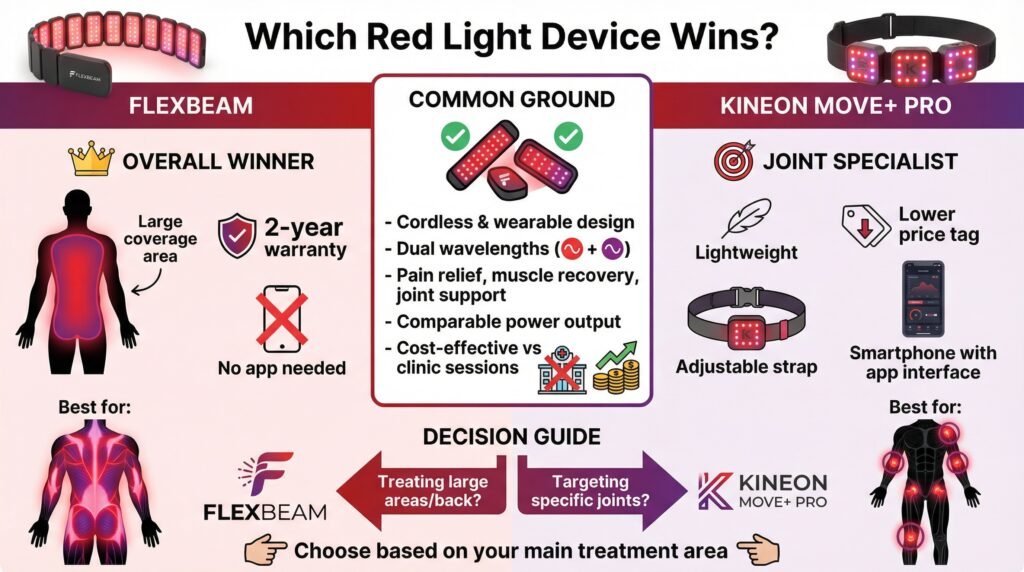
FlexBeam and Kineon MOVE+ Pro are both solid, cordless wearable red light therapy devices using similar dual wavelengths (red + near-infrared) for pain relief, muscle recovery, and joint issues.
FlexBeam wins overall for most users thanks to its larger treatment area (ideal for back, hips, and bigger muscle groups), longer 2-year warranty, and simple no-app design. Kineon is the better pick for targeted joint pain (knees, elbows, shoulders) due to its lighter weight, lower price, adjustable straps, and helpful app guidance. Both deliver comparable power and are far cheaper long-term than clinic sessions. Choose based on your main treatment area.
🧾 Table of Contents
- Introduction: At-Home Red Light Therapy vs. Professional Clinics
- Brand Overview and History (FlexBeam vs. Kineon)
- Product Design and Features Comparison
- Wavelengths, Power Density, and Performance
- Portability, Battery Life, and Build Quality
- Pricing and Long-Term Value (with savings calculator)
- Customer Service and Warranty Comparison
- Pros and Cons of FlexBeam
- Pros and Cons of Kineon
- Final Verdict and Recommendation
Introduction
So, I’ve been looking into at-home red light therapy devices for a while now, and two names keep coming up everywhere: Flexbeam and Kineon.
Both brands promise to deliver clinical-grade red light therapy without the crazy costs of going to a clinic three times a week. And honestly, when you’re looking at $100+ per session at a professional place, the math on getting your own device makes sense pretty quickly.
But here’s the thing… these aren’t cheap either. And there’s SO much confusing info out there about wavelengths, power density, irradiance, joules, it’s a lot.
So, I spent way too much time comparing these two brands to figure out what actually matters.
This comparison breaks down the real differences between Flexbeam and Kineon so you can figure out which one (if either) fits what you’re trying to do.
Brand Overview and History
Flexbeam’s Background
Flexbeam emerged from Recharge Health, a company based in Ireland. The founder had dealt with chronic pain issues and got into red light therapy after traditional treatments weren’t cutting it.
Their whole approach is targeted therapy; they designed the Flexbeam to wrap around specific body parts rather than be a big panel you stand in front of. It’s portable, runs on battery power, and you can wear it while you’re doing other stuff.
The device launched around 2019-2020 and has been positioning itself as a premium option for people who want something they can use on the go.
Kineon’s Story
Kineon is a newer company (started around 2020) that took a similar approach, wearable red light therapy instead of panels. They’re US-based and seem to focus heavily on the athletic recovery market.
Their main device is the MOVE+ Pro, which is also designed to strap onto joints and problem areas. The marketing leans hard into sports recovery, but they also talk about chronic pain management.
Kineon has been pretty aggressive with their content marketing and partnerships with athletes and physical therapists, which has gotten them decent visibility in the biohacking/wellness space.
Product Range Analysis
What Flexbeam Offers
Flexbeam keeps it simple; they basically have one main product, the Flexbeam device itself.
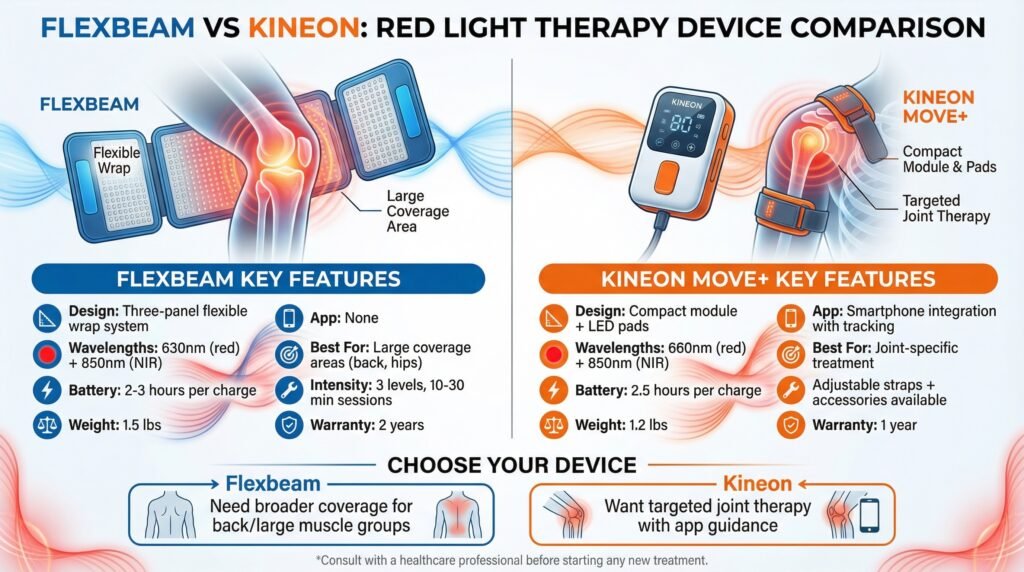
It’s a flexible three-panel system that wraps around knees, shoulders, back, hips, whatever. Each panel has LEDs that emit both red (630nm) and near-infrared (850nm) wavelengths.
The device is cordless and rechargeable. You get about 2-3 hours of use per charge, depending on the intensity setting you use.
It weighs around 1.5 pounds, which isn’t exactly feather-light, but it’s not terrible either.
They include three intensity levels and treatment times that go from 10-30 minutes, depending on what you’re treating.
What Kineon Brings
Kineon’s main product is the MOVE+ Pro. Like Flexbeam, it’s a wearable device with dual wavelengths, 660nm (red) and 850nm (near-infrared).
The MOVE+ has a different form factor, though. It’s more compact with a control module and flexible LED pads that wrap around joints.
The straps are pretty adjustable, which is nice for different body sizes and treatment areas.
Kineon also sells replacement straps and accessories separately. The device is also cordless and rechargeable, giving you about 2.5 hours of battery life per charge.
One thing Kineon does differently is its app integration. The MOVE+ connects to a smartphone app that guides you through treatment protocols and tracks your sessions.
(Whether you actually need this or if it’s just a gimmick… honestly depends on how into data tracking you are.)
The Flexbeam vs Kineon Product Comparison
When you look at Flexbeam vs Kineon side by side, both are going for the same general concept: portable, wearable red light therapy. But the execution is a bit different.
Flexbeam is larger with three separate panels, so it can cover more surface area at once. If you’re trying to treat a larger area like your lower back, that matters.
Kineon is more compact and focused on joints specifically, knees, elbows, and shoulders. The smaller form factor makes it easier to strap on tightly, which some people prefer for targeted treatment.
Quality and Performance Testing
Wavelength Specifications
This is where things get technical, but it actually matters if you want results.
Red light therapy works because specific wavelengths of light penetrate your skin at different depths. The red wavelengths (around 630-660nm) work on surface-level stuff, skin health, wound healing, that kind of thing.
The near-infrared wavelengths (around 850nm) penetrate deeper to reach muscles, joints, and connective tissue.
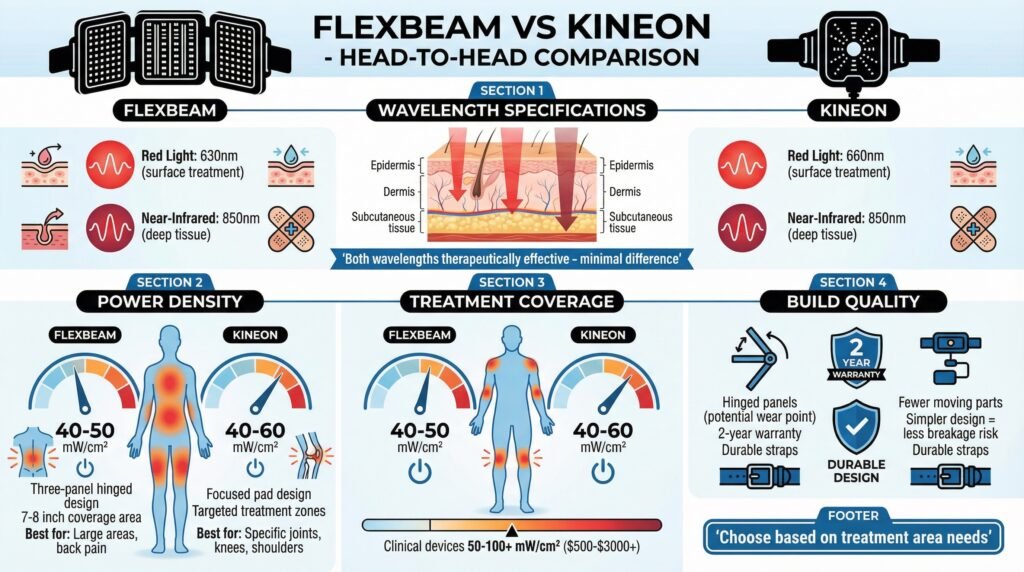
Flexbeam uses 630nm for red and 850nm for near-infrared. Kineon uses 660nm for red and 850nm for near-infrared.
The difference between 630nm and 660nm is pretty minor tbh. Both are in the therapeutic range.
Some studies use 633nm, some use 660nm; both show benefits.
So, this isn’t really a dealbreaker either way. Both devices use 850nm for the near-infrared, which is good. That’s the wavelength that shows up most consistently in research for deeper tissue treatment.
Power Density and Irradiance
Here’s where Flexbeam vs Kineon gets more interesting.
Power density (measured in mW/cm²) tells you how much light energy is actually hitting your skin. Higher isn’t always better, but you need enough to get therapeutic effects.
Flexbeam claims around 40-50 mW/cm² at the skin surface, depending on which intensity setting you use. That’s decent for a wearable device.
Kineon claims their MOVE+ delivers around 40-60 mW/cm² depending on settings and placement.
Both are in a similar range, which makes sense given they’re competing products. For comparison, clinical red light therapy devices often deliver 50-100+ mW/cm², but those are big panel systems that plug into the wall and cost $500-$3000+.
The key thing with wearables is that you’re placing them directly on your skin, so you don’t lose as much light to distance. Even at slightly lower power densities, you can still get therapeutic doses if you’re wearing them for the recommended treatment times.
Treatment Coverage
Flexbeam’s three-panel design covers a larger area, roughly 7-8 inches when wrapped around a body part. If you’ve got low back pain or want to treat a bigger muscle group, that extra coverage helps.
Kineon’s pads are smaller and more focused. Great for a specific knee or shoulder, but if you’re trying to treat multiple areas, you’ll need to move it around or do separate sessions.
Neither approach is wrong; it just depends on what you’re dealing with. Knee issues?
Kineon’s focused treatment might be better.
General back soreness? Flexbeam’s more extensive coverage probably makes more sense.
Build Quality
Both devices feel pretty solid. They’re made to handle being strapped onto sweaty bodies and moved around, so the materials are durable.
Flexbeam’s panels are connected with hinges that allow flexibility. Some reviews mention these hinges being a potential weak point over time, but the 2-year warranty should cover any issues there.
Kineon’s design is a bit simpler with fewer moving parts, which could mean less stuff to break. The straps on both devices seem to hold up well based on long-term reviews.
Customer Service Experience
Flexbeam Support
Flexbeam’s customer service is… fine. They’re a smaller company, so you’re not getting Amazon-level instant responses, but they do seem to handle issues when they come up.
They offer a 60-day money-back guarantee, which gives you time to actually test whether the device works for you. Returns seem to be processed without too much hassle, based on what I’ve seen.
The 2-year warranty is better than a lot of competitors. If something breaks or stops working, they’ll replace it.
Response times on support emails seem to run 24-48 hours typically. Not lightning fast, but reasonable.
Kineon Support
Kineon has been investing more in their customer support infrastructure as they’ve grown. They have live chat support during business hours, which is nice if you have questions about setup or protocols.
Their return policy is also 60 days, the same as Flexbeam. The warranty is 1 year, which is shorter than Flexbeam’s 2 years.
The app support is a mixed bag. When it works, it helps guide treatments.
When it glitches (which some reviews mention), it can be annoying.
The device works fine without the app, though, so it’s not a dealbreaker. Overall, customer service seems responsive. They’re active on social media and seem to handle complaints publicly, which is usually a good sign.
Flexbeam vs Kineon Support Comparison
Both companies offer similar trial periods and seem to honor their return policies. Flexbeam edges ahead on warranty length (2 years vs 1 year), which matters for a device in this price range.
Kineon gets points for the live chat option and generally faster response times, probably because they’re a bit bigger and more established in the US market.
If you want someone to check out the Flexbeam directly, you can see current pricing and warranty details here. For Kineon, their latest offers are listed here.
Pricing and Value Assessment
What You’ll Pay
This is probably what you’re most curious about, right? Because these devices aren’t cheap.
Flexbeam typically runs around $799-899, depending on promotions. They occasionally run sales that knock $100-150 off.
Kineon MOVE+ is usually priced around $599-699. They also run frequent promotions, especially around holidays.
So Kineon comes in about $100-200 cheaper on average. That’s not nothing when you’re already dropping $600+.
Cost Per Treatment Breakdown
Here’s how I think about the value proposition…
Professional red light therapy sessions run $75-150 per session in most cities. If you’re going 2-3x per week as many protocols recommend, that’s $600-1800 per month.
Absolutely insane for most people to maintain long-term.
Both Flexbeam and Kineon pay for themselves after about 6-10 professional sessions. If you’re planning to use red light therapy consistently (which you need to do to see results), the at-home device makes way more financial sense.
The difference between the two devices is about 2-3 professional sessions’ worth of cost. So really, the price difference between Flexbeam vs Kineon is less significant than the decision to get a wearable device versus going to a clinic or buying a panel system.
See the cost-savings calculator below to crunch the real-time numbers and see how the savings add up. Bookmark this page and come back to the calculator anytime you are comparing red light services in your area.
See the full article and cost-savings calculator here to crunch the real-time numbers and see how the savings add up. Bookmark this page and come back to the calculator anytime you are comparing red light services in your area.
Red Light Therapy Cost Savings Calculator
Professional red light therapy sessions run $75-150 per session in most cities. If you’re going 2-3x per week as many protocols recommend, that’s $600-1800 per month. Calculate how much you can save with an at-home device that pays for itself in just 6-10 sessions.
What Else to Consider
Battery life matters for long-term value. Both devices should last 3-5 years with regular use based on the battery tech they’re using.
Replacement batteries aren’t officially available for either, which means when the battery dies, you’re probably buying a new device.
(This is true for most wearable red light devices tbh, and it’s annoying.)
The longer warranty on Flexbeam (2 years vs 1 year) adds some value protection, especially in that critical second year when issues are more likely to show up.
Kineon’s lower upfront cost makes it easier to try out red light therapy without a huge initial investment. If you’re not sure whether you’ll stick with it, that matters.
Quick side note: If you’re trying to decide based purely on price, check current Kineon pricing here since they run promotions pretty often.
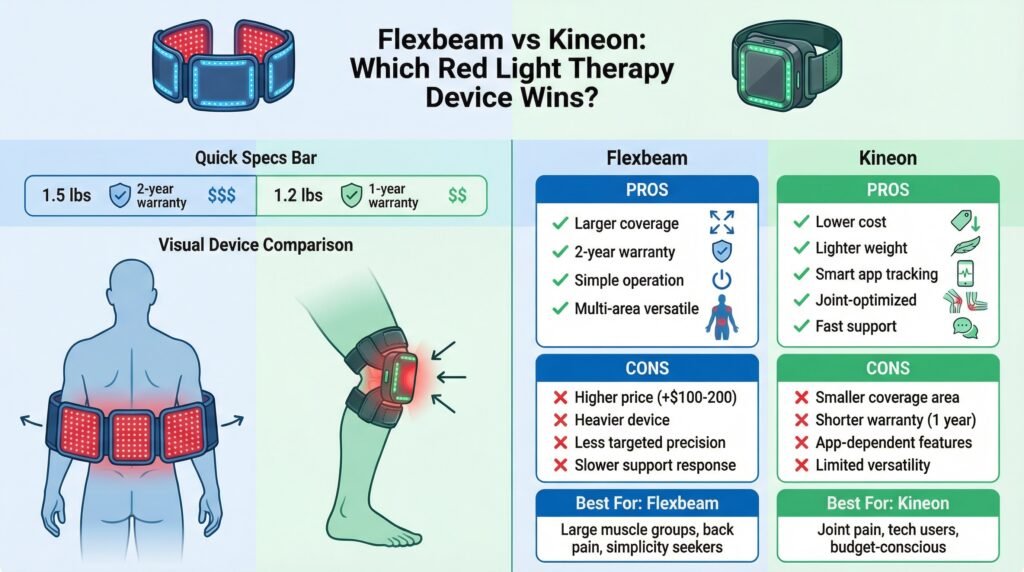
Pros and Cons Summary
Flexbeam Advantages
Larger treatment area. The three-panel design covers more surface area, which is better for treating bigger muscle groups or areas like the full lower back.
Longer warranty. 2 years of coverage gives you more protection for a device in this price range.
Simple operation. No app required, no Bluetooth connectivity issues. Just turn it on and use it.
Good for multi-area treatment. The flexible design lets you wrap it around different body parts pretty easily.
Flexbeam Drawbacks
Higher price. Usually runs $100-200 more than Kineon, depending on promotions.
Heavier. At 1.5 lbs, it’s noticeably heavier than Kineon, which matters if you’re wearing it for 20-30 minute sessions.
Less targeted. If you only need to treat one specific joint, the larger size is overkill.
Slower customer support. Being a smaller European company, response times can be slower than Kineon’s.
Kineon Advantages
Lower cost. Generally cheaper upfront, which makes it easier to try.
Lighter weight. At 1.2 lbs, it’s more comfortable for longer sessions.
App integration. If you like tracking data and following guided protocols, the app is genuinely useful.
Joint-focused design. The compact size and straps work really well for knees, elbows, and shoulders specifically.
Better customer service responsiveness. Live chat and faster email responses.
Kineon Drawbacks
Smaller coverage area. You’ll need to do multiple sessions or move it around to treat larger areas.
Shorter warranty. 1 year is pretty standard, but Flexbeam’s 2 years is better.
App dependency for some features. Some of the guided protocols only work through the app, which can be glitchy.
Less versatile. The design really is optimized for joints, so using it on your back or larger muscle groups is less convenient.
Final Recommendation
So, after comparing everything… which one should you actually get?
Go with Kineon if:
You’re mainly dealing with joint issues, knees, shoulders, and elbows. The focused design and adjustable straps work really well for these specific areas.
The lower price point makes it easier to test whether red light therapy works for you without dropping nearly $900.
The app is legitimately helpful if you’re new to red light therapy and want guidance on protocols and timing.
Athletes dealing with specific injury recovery will probably prefer Kineon’s targeted approach. It’s also lighter and more comfortable for longer wear times.
You can check out current Kineon pricing and specs on their official site by clicking the button below. They usually have some kind of promotion running.
Go with Flexbeam if:
You’re treating larger areas or multiple areas regularly. The bigger coverage area means fewer sessions to treat your full back, both hips, or large muscle groups.
If you want the simplest possible device with no app dependencies or connectivity issues, Flexbeam is more straightforward.
The longer warranty provides better long-term protection.
People dealing with chronic widespread pain or muscle soreness (rather than specific joint injuries) will probably get more out of Flexbeam’s design. See Flexbeam’s latest promotions by visiting their official site by clicking the button below.
The Bottom Line on Flexbeam vs Kineon
Both devices deliver legitimate red light therapy with proper wavelengths and reasonable power density for a wearable device. Neither is a scam nor a cheap knockoff.
The real question is whether you need focused joint treatment (Kineon) or larger area coverage (Flexbeam).
For most people dealing with workout recovery, general muscle soreness, or chronic pain in larger areas, I recommend Flexbeam despite the higher cost. The larger treatment area and longer warranty justify the price difference if you’re planning to use it regularly.
If you’re specifically dealing with a knee injury, tennis elbow, shoulder pain, or other focused joint issues, Kineon makes more sense. You’ll save some money and get a device that’s optimized for exactly what you need.
Either way, both are WAY cheaper than maintaining regular professional red light therapy sessions. If you’re already spending money on treatments or considering it, getting your own device pays for itself pretty fast.
The Flexbeam vs Kineon debate really comes down to your specific situation. Both companies offer 60-day returns, so you could technically try one and switch if it’s not working for you (though that’s obviously more hassle than just picking the right one upfront).
Ready to try one out?
Check Flexbeam pricing>>Click here or
Compare Kineon options >>Click here.
Both offer trial periods, so you can test them risk-free.
Whatever you decide, the important thing is actually using it consistently. Red light therapy isn’t a one-and-done treatment.
You need regular sessions over weeks to see real benefits.
Make sure whichever device you choose is comfortable enough and convenient enough that you’ll actually use it 3-4 times per week. That’s worth way more than small differences in specs or features.
Frequently Asked Questions (FAQs)
Q: Which device is better overall – FlexBeam or Kineon?
A: FlexBeam edges out as the winner for most people because of its larger coverage area and longer warranty. Kineon is superior if you need focused joint treatment.
Q: What are the main differences?
A: FlexBeam offers a flexible three-panel design for broader areas and simpler operation. Kineon is more compact, lighter, cheaper, and includes an app for guided protocols.
Q: Are the wavelengths and power the same?
A: Very similar. Both use red (630nm or 660nm) and 850nm near-infrared light with comparable irradiance (around 40-60 mW/cm²). The minor wavelength difference is not clinically significant.
Q: How much do they cost?
A: FlexBeam typically $799–$899 (with occasional discounts). Kineon $599–$699 (more frequent promotions). Both pay for themselves quickly compared to professional red light sessions.
Q: Which is better for knee pain or joint issues?
A: Kineon is generally better for specific joints due to its targeted straps and lighter design. FlexBeam works well but is better suited for larger areas.
Q: Do they have good warranties and support?
A: FlexBeam offers a 2-year warranty; Kineon has 1 year. Kineon provides faster live chat support, while FlexBeam uses email (slower response).
Q: Can these replace professional red light therapy?
A: Yes, for many users. Both are cost-effective for consistent at-home use (3–4 sessions per week) and offer strong ROI versus $100+ clinic visits.
This article includes affiliate links. If you click through and make a purchase, I may receive a small commission. This helps support the site and allows me to keep creating helpful content at no extra cost to you.