📌 Quick Summary
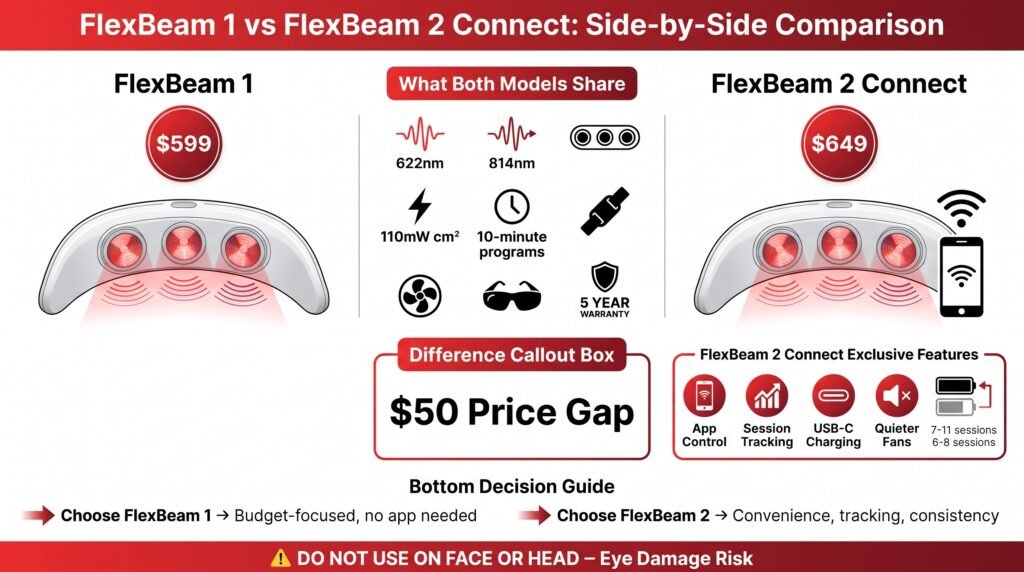
Both devices use the same basic light setup. You get red light peaking at 622nm and near-infrared at 814nm, three light pods, 110mW/cm² listed irradiance, 10-minute preset programs, body straps, cooling fans, protective eyewear, and a five-year warranty with both models.
FlexBeam 2 Connect costs $649. FlexBeam 1 costs $599.
That’s a $50 difference.
For that extra fifty bucks, the newer model gives you wireless app control, automatic session tracking, USB-C charging (finally), quieter fans, and a beefier battery that gets you roughly 7-11 sessions instead of 6-8.
The honest breakdown is this: FlexBeam 1 wins on price, FlexBeam 2 Connect wins on daily convenience. Pick the older model if you just want the light therapy without needing an app or phone control.
Pick FlexBeam 2 Connect if the tracking, quieter operation, and modern charging will actually get you to use it consistently.
One more thing before we dive in… neither device is meant for your face. Recharge specifically says not to use these on your face or head because of potential eye damage.
Click the button below to get the FlexBeam and take Advantage of HSA/FSA-eligible savings.
🧾 Table of Contents
- Introduction
- Brand Overview and History
- Product Range Breakdown
- The Real Differences Between FlexBeam 1 and 2 Connect
- Performance and Specs Deep Dive
- Customer Service and Warranty
- Cost Comparison vs Professional Sessions
- Pros and Cons Summary
- Final Verdict
Introduction
It started with trying to figure out if these devices actually do anything, then spiraled into comparing every single wearable option on the market.
The FlexBeam kept popping up everywhere, and when I saw they had two versions, I knew I had to break down the actual differences because honestly… the marketing doesn’t make it super clear what you’re really paying extra for.
So, here’s what I found after digging through all the specs, comparing the two models side by side, and figuring out which one actually makes sense for different situations. This whole FlexBeam 1 vs FlexBeam 2 Connect thing is simpler than it looks once you cut through the noise.
Brand Overview and History
FlexBeam comes from Recharge Health AS, a Norwegian company that makes wearable red and near-infrared light devices.
Their whole pitch is portability… You strap it to your knee, back, shoulder, whatever needs attention, instead of standing in front of a giant panel or booking appointments at some clinic.
The hands-free design is actually pretty smart if you think about it. You can read, work, watch TV, or just chill while the device does its thing.
Recharge talks a lot about clinical research, medical experts, safety testing, and various certifications. Their product pages mention Class II US FDA-exempt status for FlexBeam 1, and they show an FDA-Cleared badge for FlexBeam 2 Connect.
Here’s the thing, though. Those regulatory classifications don’t automatically mean every benefit they mention is clinically proven for everyone.
FDA clearance or exemption mostly speaks to safety and device classification, not guaranteed results for specific conditions.
Red light therapy does have some legitimate research behind it for certain uses (some skin stuff, some pain management applications), but the evidence quality varies a ton depending on wavelength, dose, treatment area, and what condition you’re trying to address.
A lot of the studies are small, funded by companies selling devices, or don’t have long-term follow-up data.
I’m not saying it doesn’t work. I’m saying the science is still catching up to the marketing in a lot of cases.
Product Range Analysis
FlexBeam 1
FlexBeam’s listed price is $599. Here’s everything that comes in the box:
Three light pods with six near-infrared LEDs and three red LEDs in each pod. Red light runs from 610-650nm with a peak at 622nm.
Near-infrared runs from 800-850nm peaking at 814nm.
It’s a flexible three-panel system that wraps around knees, shoulders, back, hips, whatever. Each panel has LEDs that emit both red (630nm) and near-infrared (850nm) wavelengths.
You get three preset programs, all running for ten minutes. There’s a rechargeable battery pod, carry case, mini/body/duo straps, power supply with adapters, protective eyewear, and a 52-page guidebook.
Battery life is rated for about 6-8 sessions on one charge, depending on which program you use. That’s roughly 60-80 minutes of total use before you need to plug it back in.
FlexBeam 1 uses a standard power supply (not USB-C), and it has physical buttons for control. The FlexBeam app is optional, and new customers get 60 days of access.
FlexBeam 2 Connect
This your $649, so fifty bucks more than FlexBeam 1. Same core light setup, same three 10-minute programs, same general design.
The hardware changes are where your extra money goes:
USB-C Power Delivery charging instead of a proprietary power supply. This alone is worth something to me because I already carry USB-C chargers for everything else.
Battery capacity went up to 7-11 sessions per charge. That’s roughly 30% more sessions on average.
They swapped in quieter MagLev cooling fans. The cooling is still active (there’s still fan noise), but it’s supposed to be noticeably quieter.
The big feature is wireless app connectivity. You can control it from your phone, and it automatically tracks your sessions without you doing anything.
Pre-orders get one year of full app access included, then it’s the same $4.99/month.
You also get access to four digital guides picked from their library.
The product page mentions expected delivery between January 4 and January 18 (this was the timing when I looked), so if you’re ordering, double-check current availability.
The Real Differences Between FlexBeam 1 and 2 Connect
This is where the FlexBeam 1 vs FlexBeam 2 Connect comparison gets interesting, because on paper they’re almost identical where it matters most.
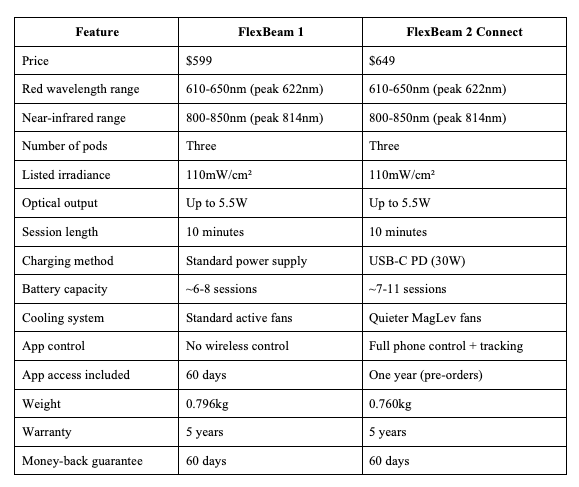
The light specs are identical. Same wavelengths, same listed power output, same irradiance.
FlexBeam 2 Connect doesn’t give you stronger light or deeper tissue penetration. The $50 premium buys you convenience features, not more powerful LEDs.
That’s actually important to understand when you’re deciding between them. If you’re thinking the newer model must be “better” in terms of light therapy effectiveness, that’s not really what’s happening here.
It’s the same therapy, delivered with better quality-of-life features.
Performance and Specs Deep Dive
Wavelengths and what they actually mean
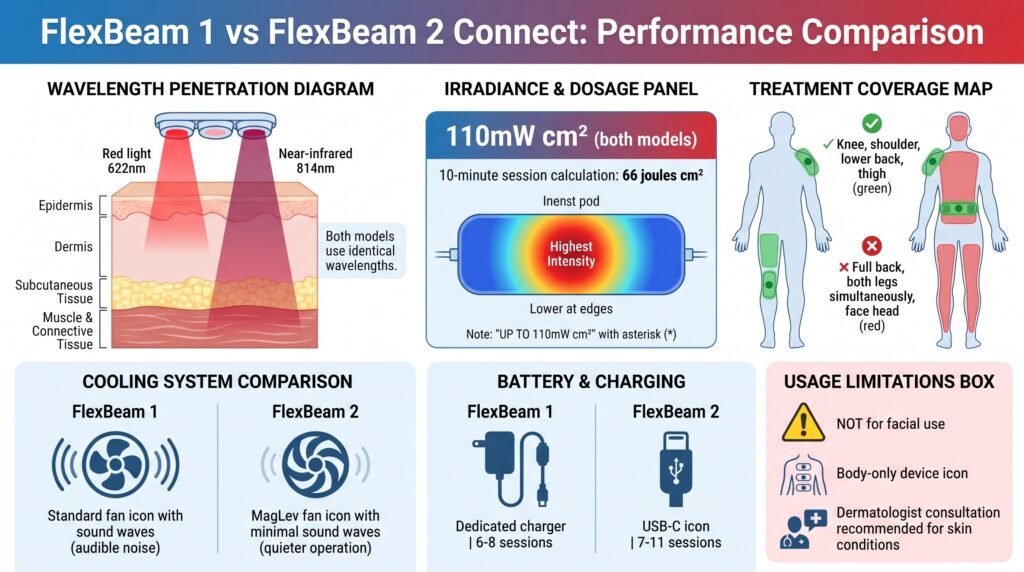
Both devices use red light around 622nm and near-infrared around 814nm. The red light is for more superficial tissue (think skin level), while the near-infrared is meant to penetrate deeper into muscle and connective tissue.
That wavelength combo makes sense for a body recovery device. It’s pretty standard in this category.
The listed irradiance is 110mW/cm² for both models. Irradiance measures light power per unit area, but it doesn’t tell you the total energy dose unless you factor in treatment time.
A 10-minute session at 110mW/cm² would theoretically deliver 66 joules/cm² if the output stayed constant across the whole treatment area. But real-world dose varies with placement, contact quality, device geometry, whether the light pulses, and how the measurement was actually taken.
The company lists this as “up to” 110mW/cm², which means you shouldn’t assume you’re getting that exact dose at every spot on your body. It’s probably highest at the center of each pod and lower at the edges.
Coverage and treatment area
Three pods give you targeted coverage for specific body parts. This isn’t a full-body panel.
You can hit a knee, shoulder, lower back, or thigh pretty well. You can’t cover your entire back or both legs at once.
That focused approach reduces wasted time (you’re not lighting up areas that don’t need treatment), but it also means longer total sessions if you want to treat many areas.
And again… no face or head use. Recharge is clear about this in their safety info.
If you’re specifically looking for a device to target facial wrinkles or acne, FlexBeam isn’t the right tool.
Cooling and noise levels
Both models use active cooling because the LEDs run fairly hot at this power level. FlexBeam 1 has audible fan noise.
It’s not crazy loud, but you’ll hear it.
FlexBeam 2 Connect uses MagLev (magnetic levitation) fans that are supposed to run quieter and last longer. The company doesn’t publish actual decibel measurements, so I can’t tell you exactly how much quieter it is.
This seems like a minor detail until you’re using it next to the TV, during meditation, or before bed. If fan noise bugs you, that’s another point in favor of the newer model.
Battery and charging upgrades
USB-C charging on FlexBeam 2 Connect is legitimately more convenient than carrying around a dedicated power supply. If you travel with it or just hate managing different chargers, that matters.
The battery bump from 6-8 sessions to 7-11 sessions means less frequent charging. For someone using it daily or many times per day, that’s noticeable.
For someone using it twice a week, probably less important.
Both devices already provide enough juice for several days of normal use, so this isn’t a dealbreaker either way. It’s just nicer on the new model.
What about skin conditions and anti-aging?
Some people looking at this FlexBeam 1 vs FlexBeam 2 Connect comparison are probably dealing with acne, psoriasis, or visible aging signs.
Red LED therapy does have some research backing for certain dermatology uses. Studies have looked at acne, psoriasis, inflammation, and fine lines with varying levels of success.
But home devices typically produce modest results, protocols aren’t standardized, and long-term evidence is thin.
More importantly, FlexBeam is a body device, not a facial device. The specs and safety warnings don’t support using it on your face.
If you have active psoriasis, unexplained rashes, persistent acne, or any skin condition that hasn’t been diagnosed, you should see a dermatologist before spending $600+ on a wellness device that isn’t designed for that specific use case anyway.
FlexBeam Testimonials
Healing red light
First of all, I love the FlexBeam for the health benefits. I have been using it for 2 years and feel so much better. Helps a lot with recovery. The team at FlexBeam is very helpful, great customer service
Ciprian Zota
I’ve been using FlexBeam for a couple…
I’ve been using FlexBeam for a couple of months now, and I’m genuinely impressed. It’s well designed, durable, and simple to work with. The real win is how much it’s helped with my back and joint pain; it’s become a go‑to tool for relief.
Carol
Absolutely LOVE IT
Signing up and using the App was so easy. The AI bot was able to answer all my questions and provide a treatment plan with the Flexbeam. I am convinced that regular use of this device in accordance with the plan was a major contributor to decompressing my three bulging discs.
Customer Service and Warranty
What You’ll Pay
Recharge offers a five-year warranty on both models, plus a 60-day money-back guarantee. That’s actually pretty solid for an expensive home device.
They also advertise worldwide shipping with duties paid under DDP terms, shipping insurance until delivery, and email/support ticket help.
The money-back guarantee excludes postage and handling. Orders can only be modified within 12 hours, and address changes after tracking starts might cost extra.
Those policies are reasonable, but you need to save your order confirmation, warranty paperwork, and return instructions. For FlexBeam 2 Connect specifically, pay attention to the pre-order delivery dates if that’s still the current status.
Cost Comparison vs Professional Sessions
FlexBeam 1 costs $599. FlexBeam 2 Connect costs $649.
The app subscription adds $4.99/month after your included access period runs out.
Professional red light therapy sessions typically run $25-150 per visit depending on where you go, session length, and what kind of facility you’re at. Medical spas and specialized clinics charge more than general wellness centers.
At $50 per session, a $599 FlexBeam 1 would equal about 12 visits before you break even. At $100 per session, you’re looking at around six visits.
That math assumes professional treatments and home treatments are equivalent, which isn’t necessarily true. Clinic equipment might cover larger areas, use different protocols, deliver higher doses, or provide trained oversight.
The home device buys you convenience and unlimited access. The value depends entirely on whether you actually use it consistently over months and years.
A $649 device that sits in your closet after three weeks is a terrible investment. A $599 device that you use three times a week for a year is probably worth it compared to booking ongoing appointments.
Professional red light therapy sessions run $75-150 per session in most cities. If you’re going 2-3x per week as many protocols recommend, that’s $600-1800 per month.
Absolutely insane for most people to maintain long-term.
Both Flexbeam1 and 2 pay for themselves after about 6-10 professional sessions. If you’re planning to use red light therapy consistently (which you need to do to see results), the at-home device makes way more financial sense.
The difference between the two devices is about 2-3 professional sessions’ worth of cost.
So really, the price difference between Flexbeam 1 vs. Flexbeam 2 is less significant than the decision to get a wearable device versus going to a clinic or buying a panel system.
See the cost-savings calculator below to crunch the real-time numbers and see how the savings add up. Bookmark this page and come back to the calculator anytime you are comparing red light services in your area.
See the full article and cost-savings calculator here to crunch the real-time numbers and see how the savings add up. Bookmark this page and come back to the calculator anytime you are comparing red light services in your area.
Red Light Therapy Cost Savings Calculator
Discover how much you’ll save with an at-home FlexBeam device compared to ongoing professional red light therapy sessions. Calculate your break-even point and total savings over time.
Pros and Cons Summary
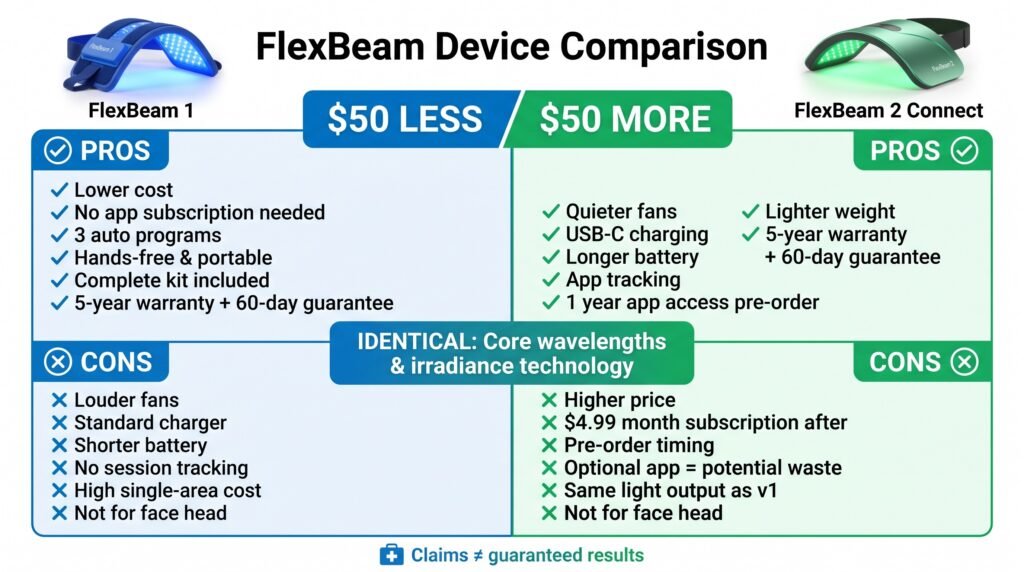
FlexBeam 1 pros
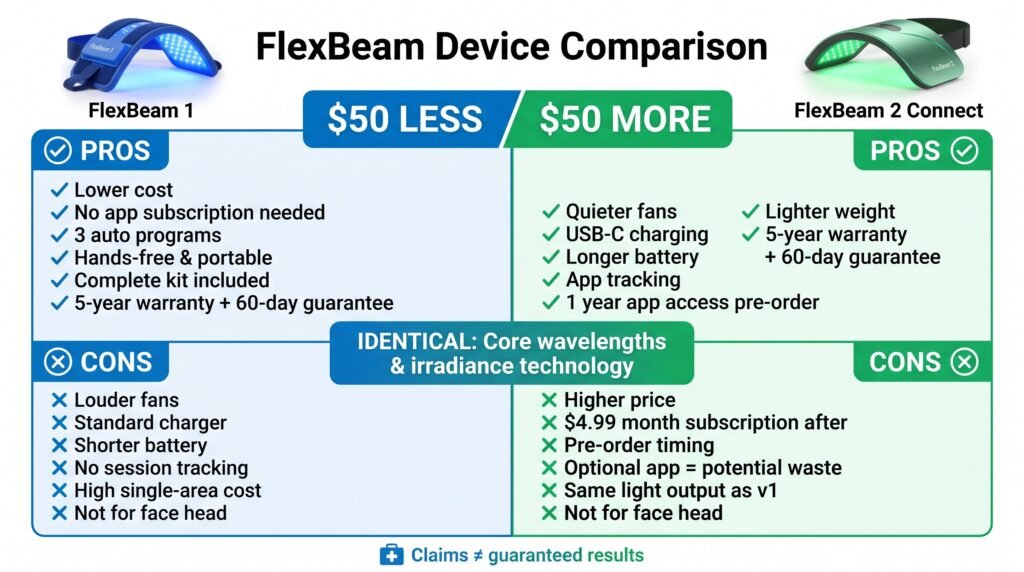
Lower upfront cost by $50. Same core wavelengths and listed irradiance as the newer model.
No app required, so there’s no subscription pressure.
Three preset programs that run automatically. Portable, hands-free design.
Everything’s included (carry case, straps, guidebook, eyewear).
Five-year warranty and 60-day money-back guarantee.
FlexBeam 1 cons
Louder cooling fans. Standard charger instead of USB-C.
Shorter battery life.
No automatic session tracking. Not designed for facial use (this applies to both models, but worth repeating).
High upfront cost for a device that only treats one area at a time.
Marketing claims shouldn’t be treated as guaranteed medical results.
FlexBeam 2 Connect pros
Same core light technology as FlexBeam 1. Quieter cooling system.
USB-C charging that works with standard cables.
Longer battery life. App control and automatic session tracking.
One year of app access for pre-orders instead of just 60 days. Slightly lighter weight. Same five-year warranty and 60-day guarantee.
FlexBeam 2 Connect cons
Costs $50 more. App subscription is $4.99/month after included access ends.
Product page shows pre-order delivery timing.
The app is optional anyway, so you might pay for a feature you don’t actually use. No evidence of stronger light output than FlexBeam 1.
Still not suitable for face or head treatment.
Final Verdict
For most people who can afford the extra $50, FlexBeam 2 Connect is probably the better choice in this whole FlexBeam 1 vs FlexBeam 2 Connect debate.
The quieter fans, USB-C charging, better battery, and automatic tracking make it easier to actually use regularly. And consistent use matters a ton because red light therapy isn’t an instant-results thing.
You need to stick with it.
FlexBeam 1 makes more sense if you’re on a tighter budget or you just don’t want an app-connected device. You’re getting the same wavelengths, same listed power, same treatment time, and same body-focused design for less money.
That’s legitimate value.
Neither model is the right pick for facial wrinkles, facial acne, or facial psoriasis because Recharge specifically excludes face and head use. If those are your main concerns, you need a different device that’s actually designed and tested for facial treatment.
The buying decision basically comes down to whether the convenience features on FlexBeam 2 Connect are worth $50 to you. If you value quiet operation, modern charging, and automatic tracking, yes.
If you just want the light therapy at the lowest price, no.
And regardless of which one you pick, don’t buy either model based on broad promises about fixing immunity, hormones, gut health, or treating specific diseases. The strongest case for FlexBeam is targeted, repeatable body use for people who want home convenience and are willing to follow a routine over time.
The light therapy itself is the same between both models. You’re just picking your preferred user experience. enough and convenient enough that you’ll actually use it 3-4 times per week. That’s worth way more than small differences in specs or features.
Frequently Asked Questions (FAQs)
What’s the difference between FlexBeam 1 and FlexBeam 2 Connect?
The light technology is identical. Both use red light (peak 622nm) and near-infrared (peak 814nm), three pods, and 110mW/cm² listed irradiance. FlexBeam 2 Connect adds wireless app control, automatic session tracking, USB-C charging, quieter MagLev fans, and a longer battery (roughly 7-11 sessions vs. 6-8).
How much do FlexBeam 1 and 2 cost?
FlexBeam 1 is $599, and FlexBeam 2 Connect is $649, a $50 difference. After the included app access ends, the app costs $4.99/month. Access is 60 days with FlexBeam 1 and one year with FlexBeam 2 Connect pre-orders.
Is FlexBeam 2 Connect more powerful than FlexBeam 1?
No. Wavelengths, optical output (up to 5.5W), irradiance, and session length are the same. The extra $50 buys convenience features, not stronger light.
Do I need the app?
No. FlexBeam 1 uses physical buttons and works without the app. The app is optional on both models, so you may end up paying for a feature you don’t use
Can I use FlexBeam on my face?
No. Recharge specifically advises against face and head use because of potential eye damage. Neither model is suited for facial wrinkles, acne, or psoriasis.
How long is a session, and how many areas can I treat at once?
Each preset program runs 10 minutes. The three pods target one area at a time, such as a knee, shoulder, or lower back. It isn’t a full-body panel.
What warranty and return policy come with it?
Both models include a five-year warranty and a 60-day money-back guarantee. The guarantee excludes postage and handling.
Is it cheaper than professional red light therapy?
Usually, if you use it consistently. Clinic sessions typically cost $25-150 each, so either device can pay for itself after roughly 6-12 professional visits, depending on the price per session. Clinic equipment may differ in coverage and dose, though
Does FDA clearance mean it’s proven to work?
Not necessarily. Clearance or exemption mostly speaks to safety and device classification, not guaranteed results. Red light therapy has some research support, but study quality varies, so avoid expecting it to fix broad health issues.
Which one should I buy?
Choose FlexBeam 1 if you’re on a budget or don’t want an app-connected device. Choose FlexBeam 2 Connect if quieter fans, USB-C charging, and automatic tracking will help you use it consistently.
This article includes affiliate links. If you click through and make a purchase, I may receive a small commission. This helps support the site and allows me to keep creating helpful content at no extra cost to you.