QUICK SUMMARY
Kineon’s red light therapy products, especially the MOVE+ Pro, are wearable devices combining red and near-infrared light (via LED and laser tech) to target joint pain, inflammation, recovery, and mobility. They deliver photobiomodulation, stimulating cellular energy production and circulation to reduce pain and speed healing.
These devices are marketed as FDA-cleared, portable, hands-free, and useful for chronic pain or athletic recovery. Real-world reviews show mixed experiences with effectiveness and company communication, but many users report meaningful pain relief and deeper penetration compared to simple LED panels.
Introduction
Kineon makes red light therapy devices that you can actually use at home without spending thousands on bulky panels or booking expensive clinic appointments every week.
In this complete guide to Kineon red light therapy products, we will explore some of Kineon’s unique offerings. The company focuses on wearable devices that mix LED and laser technology, which honestly makes a lot more sense than those giant panels you have to stand in front of for 20 minutes while doing absolutely nothing else.
You can strap on a Kineon device and keep working, exercising, or just living your life while it does its thing.
Here’s what makes their approach different from other brands. Most at-home red light therapy panels use only LEDs, which work fine for surface stuff like skin issues but struggle to reach deeper tissues.
Kineon adds near-infrared lasers to the mix, which penetrate way deeper into joints and muscles.
This matters a lot if you’re dealing with knee pain, shoulder issues, or chronic inflammation that sits beneath the surface.
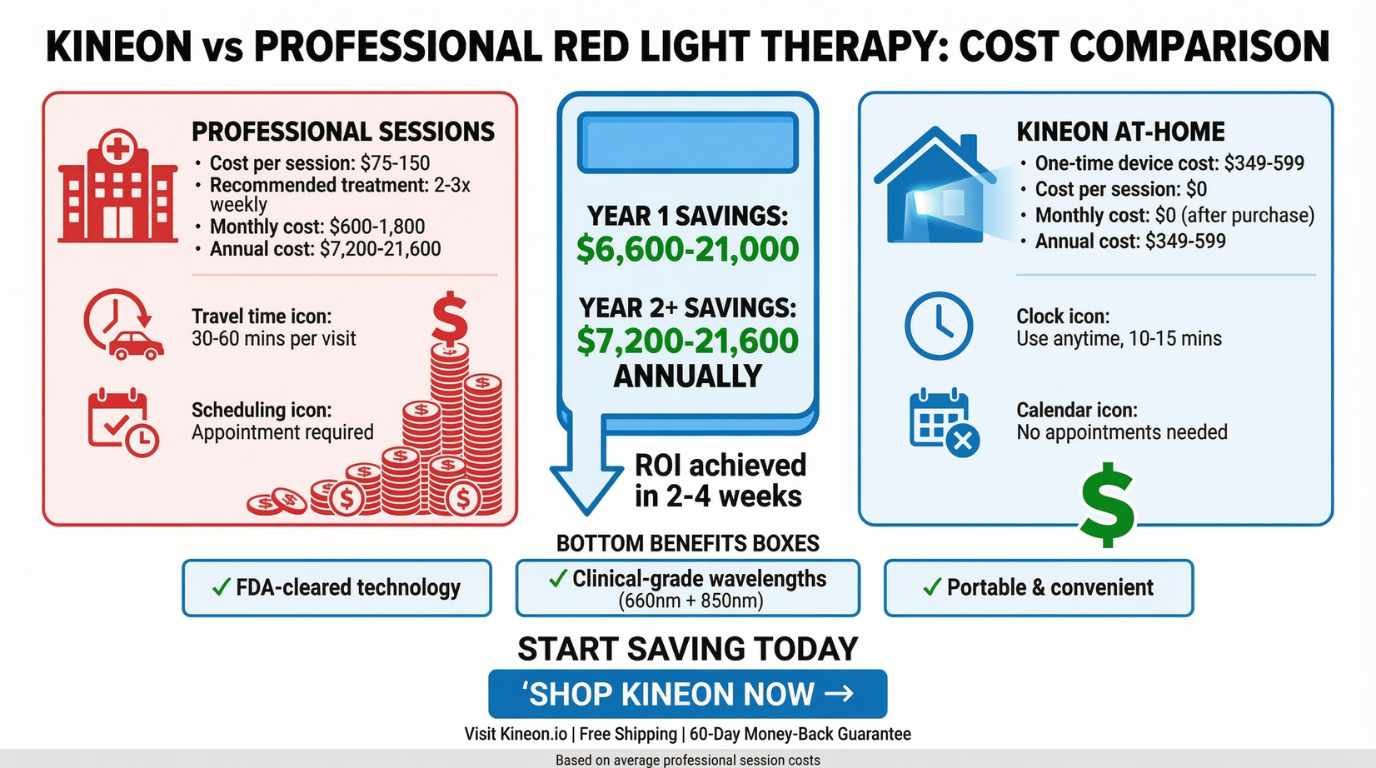
The devices aren’t cheap, but they’re way less expensive than paying $75-150 per session at a clinic three times a week. Do that math for a few months, and you’re looking at thousands of dollars, not to mention the time spent driving back and forth.
Also, as many red light therapy practitioners and users will attest, they see consistent improvement with consistent use. Much like regular daily exercise, this is not a ‘weekend warrior’ type of self-care.
See the cost-savings calculator below to crunch the numbers and get a real idea of the cost savings of the at-home Kineon products vs. frequent, costly professional red light therapy sessions.
💰 Red Light Therapy Savings Calculator
Discover how much you can save with Kineon’s at-home red light therapy compared to professional clinic sessions. Get professional-grade treatment from the comfort of your home.
📖 Table of Contents
1️⃣ Introduction to Kineon: What Is Kineon Red Light Therapy?
2️⃣ Key Products Covered
2.1. MOVE+ Pro
2.2. Other Kineon Devices (if applicable)
3️⃣ How the Technology Works
4️⃣ Benefits & Uses
5️⃣ How to Use Kineon Devices
6️⃣ Pros & Cons
7️⃣ Comparison With Other Red Light Devices
8️⃣ User Experience and Reviews
9️⃣ Safety and Precautions
10️⃣ Summary & FAQ
Introduction to Kineon
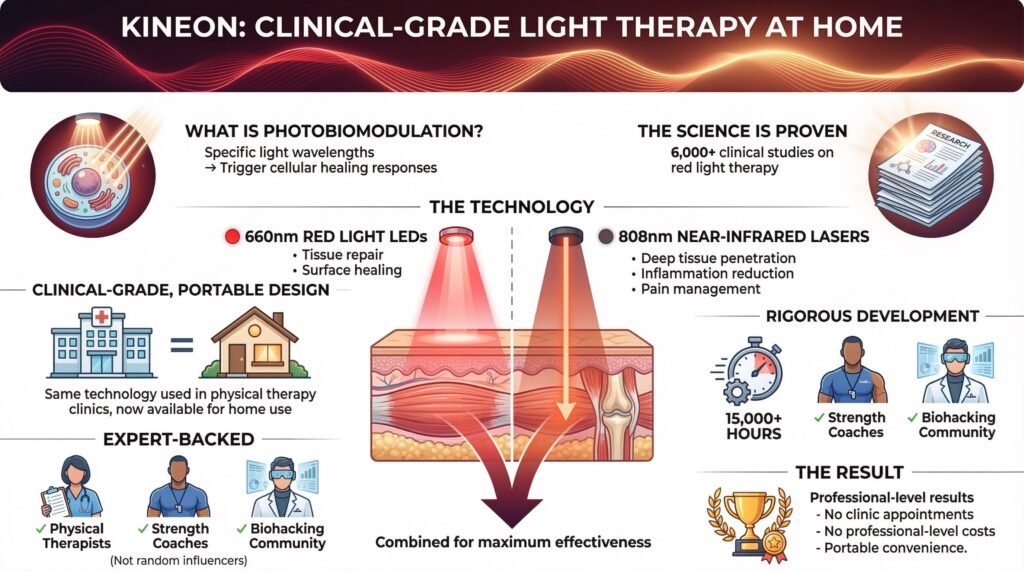
Kineon built its business around photobiomodulation technology, which is just a fancy term for using specific wavelengths of light to trigger healing responses in your cells. The science behind it is solid; there are over 6,000 clinical studies on red light therapy at this point.
The company’s flagship products use 660nm red light LEDs combined with 808nm near-infrared lasers. That specific combo isn’t random; those wavelengths have been studied extensively for tissue repair, inflammation reduction, and pain management.
What you’re getting is clinical-grade technology in a portable format. The same type of laser and LED combo used in physical therapy clinics, just designed for home use.
Kineon spent over 15,000 hours testing and developing its devices before launching them. They also got endorsements from physical therapists, strength coaches, and people in the biohacking community who actually understand how this stuff works (not just random influencers promoting whatever pays them).
The target here is pretty clear. They want to give you professional-level results without the professional-level hassle or cost.
In terms of cost savings, Kineon Move is HSA/FSA eligible, which allows you to potentially save up to 30% on your purchase. Find out more by visiting their official site. Click the button below.
Product Categories Overview
Kineon’s lineup is pretty straightforward; they’re not trying to sell you fifteen different versions of basically the same thing. Here’s what they actually offer. In this guide to Kineon red light therapy products, we will explore their major flagship products
Kineon MOVE Plus Standard
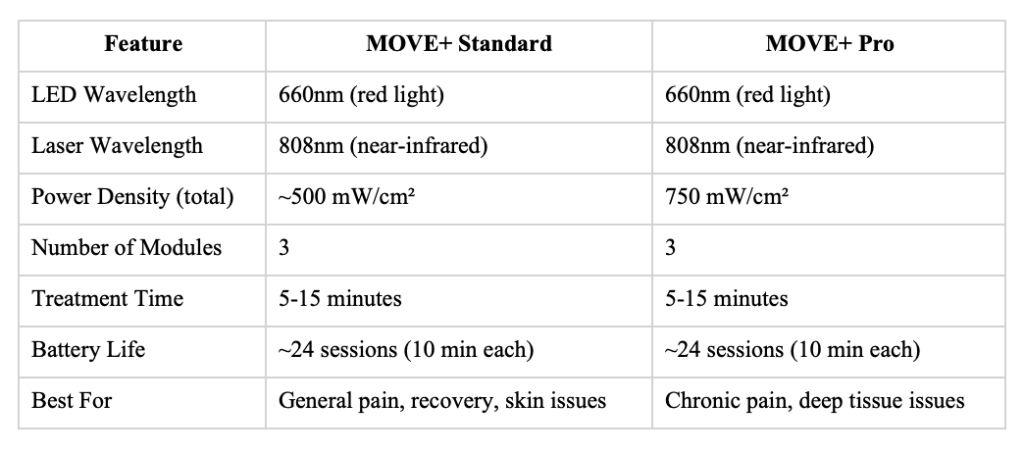
This is their main device and probably what most people should start with. You get three modules that mount onto an adjustable strap, and each module has 8 red light LEDs (660nm) plus 10 near-infrared lasers (808nm).
The strap design means you can wrap it around pretty much any joint or muscle group.
The interface is dead simple. Press the power button to turn it on, then hold the button down to add more time in 5-minute chunks.
You can go up to 15 minutes total per session.
Battery life is solid; you’ll get about 24 sessions at 10 minutes each before needing to recharge. That’s roughly three weeks if you use it daily, which is what Kineon recommends for best results.
This version works well for most people dealing with joint pain, muscle soreness, or moderate inflammation. It’s also the more affordable option if you’re not sure whether red light therapy will work for you.
MOVE+ Pro
The Pro version cranks up the power significantly. Each module puts out 250 mW/cm² of optical power, and with all three modules together, you’re getting 750 mW/cm² total.
Higher power density means faster and deeper penetration into tissues. This matters if you’re dealing with chronic conditions that haven’t responded well to lower-power devices, or if you have deep joint issues like severe osteoarthritis.
Everything else stays the same as the standard version. Same strap system, same interface, same battery setup. Whether its is knees, shoulders, elbows, lower back, calves, the Kineon MOVE Plus can help provide relief.
You’re just paying for that extra power, which can make a real difference for stubborn problems.
The trade-off is cost. The Pro version costs more upfront, though it’s still way cheaper than ongoing clinic visits.
If you’ve tried other red light devices before and didn’t get results, or if you know you’re dealing with deep tissue problems, the Pro makes sense. For everyone else, the standard version is probably fine.
MOVE+ Standard vs. MOVE+ Pro
How to Choose the Right Product
This is where people get stuck when researching any Kineon red light therapy guide. The specs tell you wavelengths and power output, but they don’t tell you which one actually solves your specific problem.
Figure Out What You’re Actually Treating
Be honest about what’s bothering you and how deep it goes.
Surface-level stuff like acne, psoriasis, or fine lines sits in the top layers of your skin. Red light therapy works great for these issues, but you don’t necessarily need the highest power to see results.
Deep tissue problems are different. A torn rotator cuff, knee osteoarthritis, and chronic lower back pain. These conditions involve joints, tendons, ligaments, and muscles that sit several layers beneath your skin.
The laser component in Kineon devices becomes really important here because lasers can penetrate 2-3 inches into tissue, while LEDs typically max out at maybe half an inch.
If you’re an athlete training hard every day and dealing with constant muscle soreness, that soreness often sits deep in the tissue. Same thing if you’ve got a nagging joint issue that’s been bothering you for months or years.
For those situations, the MOVE+ Pro’s extra power makes a real difference in how quickly you see improvement.
Think About Your Actual Lifestyle
The big advantage Kineon has over full-body panels is that you can wear them while doing other stuff. This matters way more than you’d think.
A red light panel forces you to stand or lie there for 20-30 minutes doing nothing. That’s fine if you have a ton of free time, but most people don’t.
You end up skipping sessions because you’re busy, and then the device just collects dust.
With Kineon’s strap design, you put it on in the morning and go about your day. Work at your computer, do household chores, go for a walk, whatever.
The device is working the whole time.
Consistency beats intensity when it comes to red light therapy. Using a lower-power device every single day will get you better results than using a super-powerful device twice a week.
Budget Reality Check
The standard MOVE+ costs less than the Pro, and both options are cheaper than regular clinic visits over time.
Let’s say you need red light therapy three times per week for chronic knee pain. At $100 per session (pretty average for most clinics), that’s $1,200 per month. After three months, you’re at $3,600, which is way more than either Kineon device costs.
The question becomes whether the Pro version’s 50% power increase is worth the extra money for your situation.
If you’re dealing with acute issues (recent injury, post-workout soreness, mild inflammation), the standard version probably gets you there just fine.
If you’re managing chronic conditions or you’ve tried other devices without success, the Pro’s higher intensity could be the difference between results and wasted money.
Setup and Getting Started
Kineon kept the setup process really simple. When your device shows up, you get the three modules, the adjustable strap, and a charging cable.
Getting It Ready
Snap each module into the strap slots. You’ll hear a click when they’re seated properly.
The strap adjusts to fit different body parts and different body sizes, which means one device can treat your knee one day and your shoulder the next. You’re not locked into a single treatment area.
Charge everything up before your first session. The battery comes partially charged, but you want it fully juiced for your initial use.
Your First Session
Pick whatever area is bugging you most. For a lot of people, that’s a knee, lower back, or shoulder.
Wrap the strap around that area and adjust it so the modules sit flush against your skin. This is important; if there’s a gap between the device and your skin, you lose most of the effectiveness. The light and laser need direct contact to penetrate properly.
Press the power button on any of the three modules. All three will activate together; you don’t need to turn each one on individually.
The LED indicator will blink red and then turn green to show the treatment is active.
For your first session, start with 5 minutes. Press the button once for 5 minutes, hold it down longer to extend to 10 minutes, and hold even longer for 15 minutes.
The device shuts off automatically when your time is up and gives you a little vibration notification so you know it’s done.
Finding Your Routine
Kineon recommends 5-15 minutes daily, with consistency being way more important than longer sessions done sporadically.
Most people start noticing changes within 1-3 weeks of daily use. Chronic conditions might take 4-6 weeks before you see meaningful improvement, which honestly isn’t that long considering how long you’ve probably been dealing with the issue.
Don’t expect instant pain relief, though some people do report it. The device works by increasing blood flow and boosting ATP production in your cells, which kicks off your body’s natural healing response.
That’s a physiological process that happens over time, not an instant switch.
To check current pricing and if Kineon is running any deals right now, visit their official site by visiting the link below.
Advanced Tips and Tricks
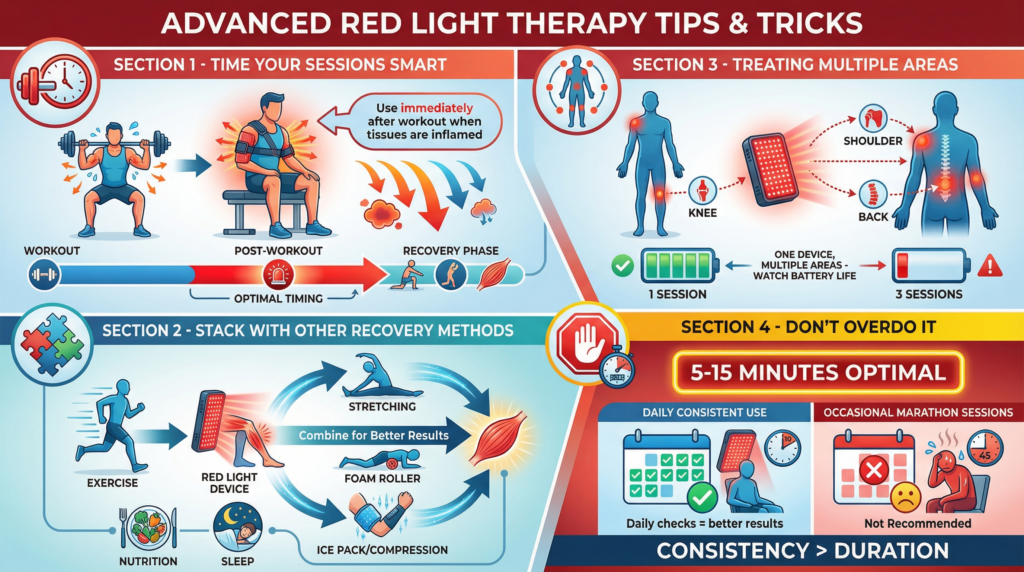
Once you’ve been using the device for a few weeks, these strategies can help you get even better results.
Time Your Sessions Smart
Using it right after a workout or physical activity makes sense physiologically. Your tissues are already inflamed from the activity, and red light therapy can reduce that inflammation faster while supporting the repair process.
This is why athletes specifically build it into their recovery routine as opposed to using it randomly throughout the day.
Stack It With Other Recovery Methods
Red light therapy doesn’t replace stretching, foam rolling, proper nutrition, or sleep. But it works really well alongside those things.
Some people use it right after a workout, then do their stretching routine, then use compression or ice if needed. The increased blood flow from the red light helps other recovery methods work better.
Treating Multiple Areas
If you’ve got several problem areas, you don’t need to buy many devices. The modular design means you can treat different spots on different days, or even reposition the strap during a single session.
Just keep track of battery life. If you’re doing three separate 10-minute sessions in one day, you’ll drain the battery faster than doing one session.
Don’t Overdo It
There’s a temptation to think more is better and go way past the recommended 15-minute max. Don’t.
Kineon’s protocols are based on actual clinical research. They’ve optimized the 5-15 minute window for both safety and effectiveness.
More importantly, consistency over weeks and months matters way more than cramming in extra time per session. Show up every day at the recommended duration, and you’ll get better results than doing occasional marathon sessions.
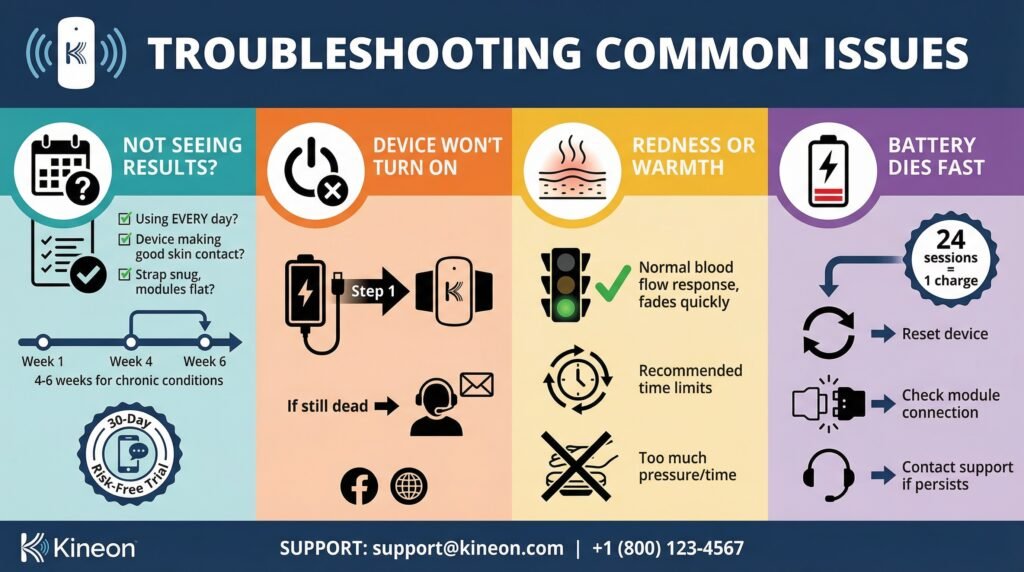
Troubleshooting Common Issues
Not Seeing Results After 2-3 Weeks
First question: Are you actually using it every day? Not most days, not when you remember, every single day.
Results compound with consistency.
Second check: Is the device making good skin contact? Even a small gap reduces effectiveness significantly.
Make sure the strap is snug, and the modules are sitting flat against your skin.
Third consideration: some chronic conditions genuinely need the full 4-6 weeks before you see meaningful improvement. If you’ve only been at it for two weeks, keep going.
If you’ve been consistent with daily use for a full month and you’re still not seeing any progress, Kineon offers a 30-day risk-free trial period. You can reach out to them for guidance or a refund.
Device Won’t Turn On
Check the battery first. It might just need charging.
Use the charging cable that came with the device and give it time for a full charge. If it still won’t power on after charging, contact Kineon’s support team.
They have a Facebook group and online resources that can help troubleshoot.
Mild Redness or Warmth at the Treatment Site
This happens sometimes and usually fades shortly after treatment. It’s just a normal response to increased blood flow, not a sign of damage.
That said, if you’re using it for way longer than recommended or pressing it too hard against your skin, you can occasionally irritate. Stick to the recommended treatment times, and you’ll be fine.
Battery Dies Too Fast
The battery should give you about 24 ten-minute sessions before needing a recharge. If you’re seeing way fewer sessions per charge, try resetting the device or checking that the modules are fully seated in the strap.
A loose connection can drain power faster. If the problem continues, reach out to support.
Long-Term Use and Maintenance
Owning a red light therapy device isn’t like taking a medication where you stop after a certain period. The benefits compound over time, especially for chronic stuff.
A common pattern is starting with daily use for the first 4-6 weeks, then transitioning to 3-4 times weekly for maintenance. This keeps the benefits going without requiring a daily commitment forever.
Maintenance is minimal. Clean the modules with alcohol-free antibacterial wipes when needed. Avoid harsh chemicals or alcohol-based products that could damage the silicone coating on the modules.
The long-term advantage of at-home red light therapy is that you’re building a recovery tool you can use indefinitely. No scheduling appointments, no driving to clinics, no recurring costs. Your device is always there when you need it, after a tough workout, during a flare-up of chronic pain, or just as part of your regular wellness routine.
Conclusion and Next Steps
Choosing the right red light therapy device comes down to understanding what you’re actually treating, how deep it goes, and being realistic about your lifestyle and budget.
Kineon’s Kineon red light therapy guide approach removes the biggest barriers to red light therapy, the hassle and expense of clinic visits, by giving you portable, research-backed devices you control completely.
The standard MOVE+ works well for most people dealing with mild to moderate pain or athletes looking for faster muscle recovery. The MOVE+ Pro justifies the extra cost if you’re dealing with chronic deep-tissue conditions or you want faster results.
Before you commit, understand that red light therapy needs consistency. Real results show up over weeks, not days.
This isn’t a magic bullet. It’s a tool that removes obstacles to your body’s natural healing process and gives it the support it needs to actually fix problems as opposed to just masking symptoms.
If you’ve been frustrated by expensive clinic visits or you’re skeptical about whether red light therapy actually works, Kineon’s 30-day risk-free trial removes the risk from trying it.
See all Kineon devices and current pricing>>HERE.
Learn how to use HSA/FSA funds to save up to 30% on Kineon devices>>HERE.
Check out the MOVE+ Pro if you need higher power for chronic issues>>HERE.
Start with whatever area bothers you most. Commit to daily use for a full month.
Track whether your pain improves, your mobility increases, or your recovery time gets shorter.
That’s really the core of any effective guide to Kineon red light products, not obsessing over specs and research papers, but actually applying the device consistently and giving your body time to respond.
❓ FAQ Section
Q: What is Kineon red light therapy?
A: It’s a form of photobiomodulation therapy using specific wavelengths of red (~650–660 nm) and near-infrared (~808–850 nm) light to stimulate cellular energy (ATP), increase blood flow, reduce inflammation, and support tissue repair. The Kineon devices combine LEDs and medical-grade lasers for deeper penetration than typical LED panels.
Q: What is the Kineon MOVE+ Pro?
A: The MOVE+ Pro is Kineon’s flagship wearable red light therapy device designed for targeted pain relief and recovery, particularly for joints (knees, shoulders, etc.). It uses a modular strap system and combines LED and laser diodes to deliver deeper, focused therapeutic light.
Q: What conditions can it help with?
A: Common uses include joint and muscle pain relief, inflammation reduction, tissue healing, and post-exercise recovery. Marketing claims and some reviews also suggest benefits for chronic inflammation, arthritis pain, and mobility issues.
Q: How long should I use it to see results?
A: Many sources suggest 10–15 minutes per day of consistent use, with some users noticing relief in 1–3 weeks, though individual results vary depending on condition and frequency of use.
Q: Is it safe? Are there side effects?
A: Red light therapy is non-invasive and generally regarded as safe. Side effects are rare but can include mild warmth or temporary skin redness. As with any medical device, consult a healthcare provider with specific health conditions.
Q: Do experts support red light therapy?
A: Photobiomodulation, the science behind red and near-infrared light therapy, has been studied extensively and is used clinically for pain, recovery, and tissue repair in various settings. However, individual effectiveness and the quality of devices can vary, and clinical consensus is still developing.
Q: How does Kineon compare to other RLT devices?
A: Compared with basic LED panels, wearable devices like Kineon’s are more targeted and portable, and the laser/LED combo may reach deeper tissues. Some experts still recommend larger panels or other formats depending on your goals (e.g., full-body vs. localized therapy).
This article includes affiliate links. If you click through and make a purchase, I may receive a small commission. This helps support the site and allows me to keep creating helpful content at no extra cost to you.